
- Catalogs
- ReDent Nova
- EndoStation


EndoStation

EndoStation
This section explains the symbols used in the document, such as Class II Equipment and CE marking, and stresses the importance of following instructions to avoid hazards. It also notes that the device should not be disposed of as regular household waste.
Precautions include keeping the device away from liquids, flammable gases, and ionizing radiation, and ensuring it is installed in a ventilated area away from heat sources. Maintenance should be performed only by authorized personnel.
The device is intended for use by trained dental professionals without memory or concentration issues and is suitable for all patients regardless of physical characteristics.
Instructions include checking all components for damage, and details on the front and rear panel connections, including the LCD screen, micromotor, footswitch, power switch, and supply connection.
Detailed instructions for first use, setting parameters, and operating in different modes such as SAF System Mode, ROTARY Mode, and RECIPROCATING Mode are provided.
Information on autoclavable components and replacement instruments is provided, along with maintenance instructions.
Guidelines for maintaining the motor, control unit, and accessories to ensure longevity and proper function are outlined.
Common issues and solutions are provided to assist users in resolving problems.
Specifications include maximum speed and torque, and compliance with IEC standards.
Instructions for proper disposal in accordance with relevant directives are included.
The device comes with a 12-month warranty covering manufacturing defects, excluding damage from incorrect maintenance or use.
Details on emissions, immunity, and recommended separation distances to ensure safe operation are provided.
The manufacturer's liability and compliance with regulations are clarified, including classification under the European Medical Device Directive and compliance with IEC 60601-1 standards.
Illustrations of the device's front and rear views, footswitch, micromotor, and control panel are included.
The system includes a multifunction footswitch with a main switch for the motor and irrigation pump system, and an irrigation On/Off switch.
Steps include ensuring the power switch is off, confirming power line voltage, connecting the power supply, and ensuring proper placement and connection of the footswitch and micromotor cords.
Instructions for calibrating the contra-angle handpiece torque and setting parameters like speed, torque, and flow rate according to the mode are provided.
Programmable parameters include speed and flow rate, with recommended settings provided.
Instructions for setting speed, torque, rotation direction, and auto-reverse type are included, with notifications for torque limits.
Instructions for setting speed and rotation angles are provided.
Details on which components are autoclavable and cleaning instructions for non-sterilizable parts are provided.
Guidelines for replacing endodontic files and sterilizing the irrigation line cassette are included.
Instructions for switching off the control unit and disconnecting components before maintenance are provided, along with cleaning guidelines.
Solutions for common issues like power supply defects and footswitch problems are provided.
The EndoStation operates at a maximum speed of 10,000 rpm and a maximum torque of 10 Ncm, and is not suitable for use with flammable anesthetics.
The EndoStation must be disposed of according to specialized procedures for electronic equipment.
The product has a 12-month warranty covering manufacturing defects.
Precautions regarding electromagnetic compatibility are required, and the device should not be used near mobile telecommunication devices.
Field strengths of fixed radiofrequency emitters must be below compliance levels to prevent interference.
Recommended separation distances between radiofrequency emitters and the device are provided based on the emitter's power and frequency.
Cables and accessories should be less than 3m in length to comply with RF emission and immunity standards.
The manufacturer disclaims liability if installation recommendations are not followed or unauthorized repairs are made.
The device is classified as class IIa under European Medical Device Directive and complies with IEC 60601-1 standards.
Figures illustrating the device's front and rear views, footswitch, micromotor, and control panel are included.
Catalog excerpts

Multifunctional Endodontic Motor
Open the catalog to page 1
Thank you for purchasing the EndoStation™ The EndoStation™ is a unique product combining a digital electrical endodontic micromotor with a peristaltic pump. The micromotor is compatible with the rotary and reciprocating files offered by all major file manufacturers. It integrates an optical encoder to ensure an accurate angular position. This technology enables to operate the files in the following methods: 1. Self-Adjusting Files ("SAF"), including continuous irrigation 2. A traditional Rotary motion, with speed control and torque control 3. A Reciprocating motion, with a reverse/forward angular...
Open the catalog to page 3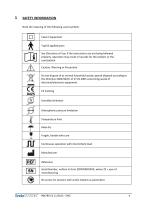
Note the meaning of the following used symbols:
Open the catalog to page 4
United States Federal Law restricts this device to sale by or on order of a Physician. Intended Use: The EndoStation is a medical device designed for use by dentists for use with dental root canal instruments in continuous rotation with torque control or in reciprocating movement. Read this instruction booklet carefully before installing and using the machine to obtain the best possible results and maximum operating safety. Manufacturer’s liability is applicable only if the device is used as directed, and if the safety instructions are properly followed. Manufacturer is not liable for uses other...
Open the catalog to page 5
Take the following precautions to reduce the risk of any accident: Environment Determine a suitable location within the following precautions: ■ Do not immerse the device in liquid, and do not use it outdoors. ■ Do not expose the device to water vapor, or splashes. ■ The device is not designed for use in the presence of anesthetic gases or any other flammable gas. ■ The device is not designed to work near ionizing radiation. ■ Do not install near a source of heat or humidity (piping, valves, tanks, etc.). ■ In order to maximize air flow, install the device in a ventilated area. ■ Do not cover...
Open the catalog to page 6
WARNING TO THE END USER User population The use of the EndoStation™ is exclusively limited to trained, competent and qualified dental healthcare professionals in the ordinary course of their activities. The user is not the patient. The user must have the mandatory skills related to the principles of dental and medical hygiene such as cleaning, disinfection, and sterilization of medical devices. The electric motor functions can be used without taking in consideration the adult user’s characteristics such as weight, age, size, or gender. The user must wear gloves. Users must not: Have memory...
Open the catalog to page 7
Carefully remove the unit and the accessories from their packaging and place them properly on a flat surface in the desired location. Before set-up, check that all parts are present in the box: ■ 1 EndoStation™ control unit ■ 1 Stainless steel irrigation bottle holder ■ 2 Standard bottle caps ■ 1 Active bottle cap, with insertion apertures ■ 1 EndoStation™-specific irrigation line (non-sterile) ■ 1 Silicone portable mount for handpiece ■ 1 Power supply transformer with cord ■ "Instructions for Use" manual Notes ■ None of the components are delivered disinfected or sterilized! ■ Prior to installation,...
Open the catalog to page 8
The EndoStation™ should be connected to the electrical supply in accordance with current standards. Installation instructions: 1. Check that the power switch is set to an OFF position. 2. Confirm adequate power line voltage (100V to 240V). 3. Connect the power supply to the electrical mains. 4. Connect the power cord to the EndoStation™ by inserting the connector into the receptacle on the rear aspect of the device. Make sure the power cord is well-fitted. 5. Place the footswitch properly to allow easy operation. 6. Connect the footswitch cord into the receptacle at the front panel of the device....
Open the catalog to page 9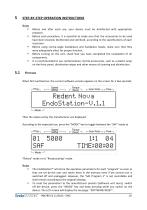
STEP-BY-STEP OPERATION INSTRUCTIONS Notes Before and after each use, your device must be disinfected with appropriate products. Before each procedure, it is essential to make sure that the accessories to be used have been cleaned, disinfected and sterilized, according to the specifications of each accessory. Before using contra-angle handpieces and handpiece heads, make sure that they were adequately oiled, for proper function. Before turning on the unit, check that you have completed the installation of all components. It is recommended to use contamination control accessories, such as a...
Open the catalog to page 10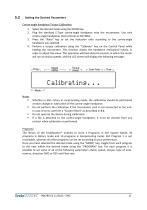
Setting the Desired Parameters Contra-angle handpiece Torque Calibration: 1. 2. 3. 4. Select the desired mode using the MODE key. Plug the sterilized E-Type contra-angle handpiece onto the micromotor. Use only contra-angle handpieces that conform to ISO 3964. Press the "Ratio" key to set the reduction ratio according to the contra-angle handpiece you selected. Perform a torque calibration using the "Calibrate" key on the Control Panel while holding the micromotor. This function checks the handpiece mechanical inertia, in order to adjust this value. This operation will take about 8 seconds, in...
Open the catalog to page 11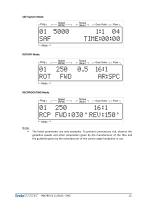
[— Gear Ratio —| p Flow -| ROTARY Mode: ■ (Not? n r Gaar Rati° HI r Flow n LMode —1 ■ The listed parameters are only examples. To prevent unnecessary risk, observe the guideline speeds and other parameters given by the manufacturer of the files and the guideline given by the manufacturer of the contra-angle handpiece in use.
Open the catalog to page 12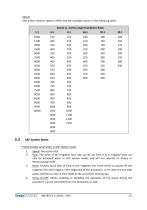
Speed: Sets motor rotation speed in RPM. See the available values in the following table: Programmable parameters in SAF System mode: 2. Flow: The value of the irrigation flow rate can be set from 0 to 9. Irrigation flow can only be activated when in SAF System mode, and will not operate on Rotary or Reciprocating mode. 3. Rinse: Enables quick flow of fluid in the irrigation line. Used either to quickly fill the irrigation line with irrigant in the beginning of the procedure, or to clean the line with water and then to clear it from fluids at the end of the working day. 4. Pump On/Off: Allows...
Open the catalog to page 13
Settings in SAF System mode: 1. 2. 3. 4. Perform a Torque Calibration as described in 5.2. Set speed and flow-rate of irrigation parameters. Recommended parameters for SAF System mode are: 5,000 rpm and flow level 4. Torque and gear ratio are not programmable for SAF System mode. Only a 1:1 gear ratio should be used at this mode, without motor-driven torque control. Please refer to the Self-Adjusting Files manufacturer's recommendations and "Clinical Guidelines" for proper use. Once the parameters have been set: a. Attach the irrigation tube to a SAF (file) and fit the file to the contra-angle...
Open the catalog to page 14All ReDent Nova catalogs and technical brochures
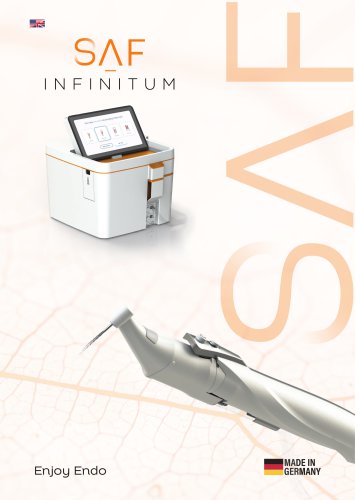 SAF INFINITUM
3 Pages
Archived catalogs
 SAF System brochure
4 Pages
 RDT3 Compatibility Guide
2 Pages
 VATEA
VATEA19 Pages
- Electric micromotor
- Dental micromotor
- Medical device control panel
- Root canal treatment endodontic file
- Rotary endodontic file
- Dental file
- Nickel titanium endodontic file
- Flow control panel
- Control system with touchscreen
- Gutta-percha point
- Root canal treatment dental file
- Cordless micromotor
- Nickel titanium dental file
- Pump control unit
- Glide path endodontic file
- Rotary dental file
- Rechargeable micromotor