- Catalogs
- Rivanna Medical
- USER’S MANUAL

USER’S MANUAL
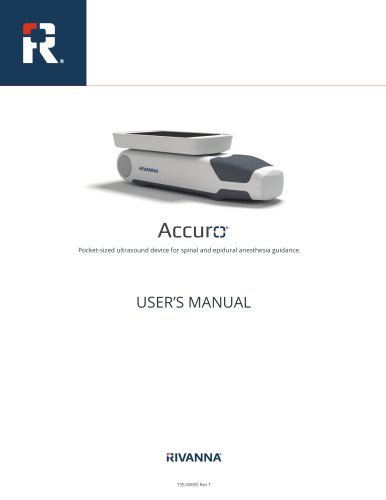
USER’S MANUAL
The Accuro is a portable ultrasound device for spinal and epidural anesthesia guidance, restricted to physician use in the U.S. It is proprietary to Rivanna Medical, Inc., and protected by patents. Users should consult online manuals for the latest information.
The Accuro is a self-contained unit with an ultrasound system, probe, and touchscreen. It offers LUMBAR and THORACIC presets for 3D spine navigation using SpineNav3D technology, automating spinal landmark detection and depth measurements.
The device uses an ultrasound transducer to create real-time images. SpineNav3D is validated for lumbar and thoracic spine analysis in both obese and non-obese patients.
The Accuro is intended for diagnostic ultrasound imaging in various clinical applications but not for ophthalmic use.
Only trained physicians should use the device. It should not be used with flammable anesthetics or near heat sources and is not evaluated for use with high-frequency surgical equipment. Proper disposal of hazardous materials is required.
The device includes a battery charger and accessories, with a console display offering various preset scanning screens.
The device aids in guiding epidural and spinal anesthesia. Users can generate reports and save images externally. Regular software updates are recommended.
Proper care includes cleaning and disinfection. The device should not be sterilized or immersed in disinfectant solutions.
The device complies with standards for electromagnetic emissions and immunity.
Specifications cover operating conditions, probe details, acoustic output, and battery information. Users should understand the device's accuracy and limitations.
Safety precautions and symbols are outlined to ensure proper use and handling.
The document emphasizes secure handling of Protected Health Information (PHI), password protection, and data backup before repairs.
The Accuro includes a USB wall charger, micro-USB cables, acoustic coupling gel, and a carrying case. It features a rotating touchscreen, power/image capture button, and ultrasound probe.
The console includes an LCD touchscreen and power button with multiple functions, detailing imaging presets and settings.
Procedures for using SpineNav3D technology for anesthesia guidance are outlined, including exam report generation and external computer connectivity.
Maintenance includes inspecting for damage, cleaning, and ensuring electromagnetic compatibility. Guidelines for cleaning and disinfecting are provided.
Specified accessories and cables prevent increased emissions or decreased immunity. Guidance is provided for handling electromagnetic interference.
The device complies with standards for RF emissions and electromagnetic immunity, suitable for professional healthcare environments.
Guidelines for maintaining separation distances from RF communications equipment are provided.
The ALARA principle emphasizes minimizing acoustic exposure while obtaining diagnostic results.
Specifications include dimensions, weight, display type, operating conditions, and battery details. The device features a lithium-ion battery with a 90-minute imaging life.
Acoustic measurement uncertainties and safety symbols are detailed.
Contact details for Rivanna Medical, Inc. are provided for further inquiries and support.
Catalog excerpts
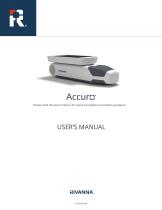
Pocket-sized ultrasound device for spinal and epidural anesthesia guidance. USER’S MANUAL
Open the catalog to page 1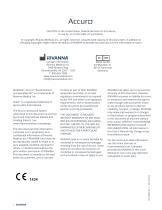
CAUTION: In the United States, federal law restricts this device to use by, or on the order of, a physician. © Copyright, Rivanna Medical, Inc., all rights reserved. Unauthorized copying of this document, in addition to infringing copyright, might reduce the ability of RIVANNA to provide accurate and current information to users. MDSS GmbH Schiffgraben 41 30175 Hannover Germany |J rivanna Contact Information: 2400 Hunters Way Charlottesville, VA 22911 USA T: 800-645-7508 www.rivannamedical.com [email protected] RIVANNA®, Accuro®, BoneEnhance®, and SpineNav3D™ are trademarks of Rivanna Medical,...
Open the catalog to page 2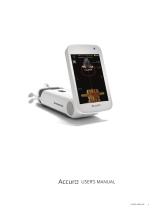
USER’S MANUAL USER’S MANUAL
Open the catalog to page 3
Table of Contents Accuro
Open the catalog to page 4
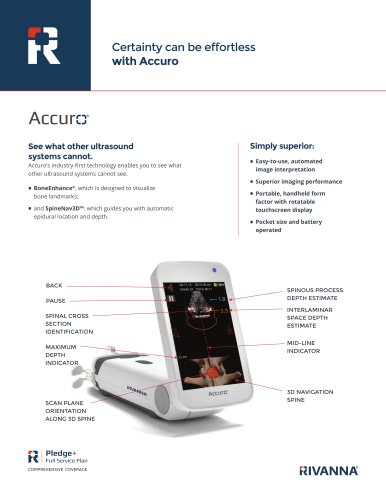
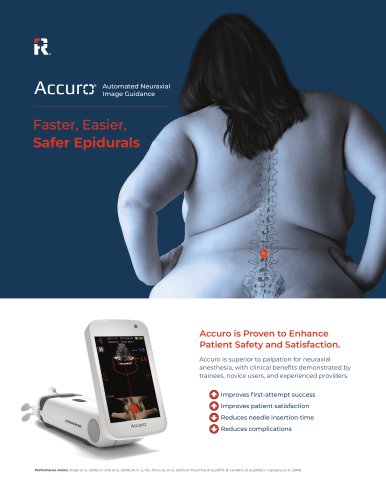
The Accuro is a pocket-sized and battery operated ultrasound instrument. The device is a single self-contained unit consisting of an ultrasound system, ultrasound probe, and rotatable touchscreen display. The instrument provides LUMBAR and THORACIC presets to facilitate epidural and spinal anesthesia imaging guidance with real-time 3D navigation of the lumbar or thoracic spine. The LUMBAR and THORACIC presets use proprietary technology, called SpineNav3D, to automate spinal bone landmark detection and depth measurements and to assess realtime scan plane orientation in 3D. Accuro ultrasound scans...
Open the catalog to page 5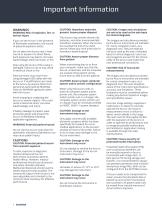
WARNING! Risk of explosion, fire, or serious injury If you use the Accuro in the presence of flammable anesthetics, the hazard of potential explosion exists. Do not place the Accuro near a heat source or expose it to direct flame. Such exposure may lead to corrosive liquid leakage, electrical shock, or fire. Stop using the Accuro if the casing is damaged. Failure to do so may result in electrical shock or fire. Electrical shock may result from using damaged USB cables with the Accuro or if modifications are made to the Accuro by anyone other than personnel authorized by RIVANNA. Only use RIVANNA...
Open the catalog to page 6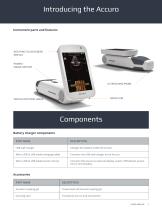
ComponentsBattery charger components PART NAME
Open the catalog to page 7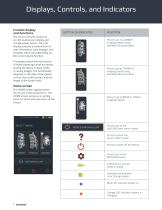
Console display and functions The Accuro console consists of an LCD touchscreen display and a single power button. The LCD display presents a combination of user information, scan displays, and prompts, which vary depending on the current device function. The power button has the function of either powering on/off the device, putting the device in sleep mode, or saving images. The functionality depends on the state of the device, such as the current screen, and the length of the button hold. The HOME screen appears when the Accuro is first powered on. The HOME screen serves as a starting point...
Open the catalog to page 8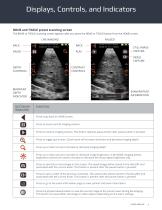
The BONE or TISSUE scanning screen appears after you press the BONE or TISSUE button from the HOME screen.
Open the catalog to page 9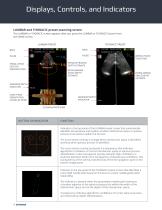
Displays, Controls, and Indicators LUMBAR and THORACIC preset scanning screen The LUMBAR or THORACIC screen appears after you press the LUMBAR or THORACIC button from the HOME screen. LUMBAR PRESET THORACIC PRESET NEEDLE-TRACK INDICATOR SPINOUS PROCESS DEPTH ESTIMATE SPINAL CROSS SECTION IDENTIFICATION INTERLAMINAR SPACE DEPTH ESTIMATE INTERLAMINAR SPACE DEPTH ESTIMATE MAXIMUM DEPTH INDICATOR SCAN PLANE ORIENTATION ALONG 3D SPINE MAXIMUM DEPTH INDICATOR 3D NAVIGATION SPINE FUNCTION Indicator in the top panel of the LUMBAR preset screen that automatically identifies the presence and location of...
Open the catalog to page 10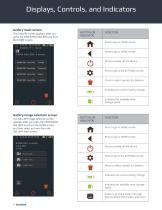
Gallery main screen The GALLERY screen appears after you press the VIEW EXAM GALLERY icon from the HOME screen. II EXAM GALLERY: 4 exams EXAM 001 Jane Ooe Tissue EXAM 001 Jane Doe Thoracic EXAM 001 Jane Doe Bone EXAM 001 Jane Doe Lumbar InfGallery image selection screen The GALLERY image selection screen appears after you press the VIEW IMAGE GALLERY icon from the HOME screen and then select an Exam from the GALLERY main screen. EXAM 004 Lumbar Jane Doe 3 files
Open the catalog to page 12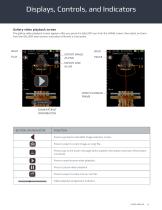
The gallery video playback screen appears after you press the GALLERY icon from the HOME screen, then select an Exam from the GALLERY main screen, and select a file with a 'cine' prefix.
Open the catalog to page 13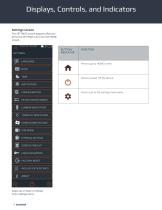
The SETTINGS screen appears after you press the SETTINGS icon from the HOME screen.
Open the catalog to page 14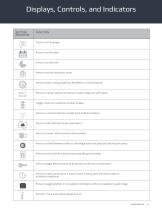
Displays, Controls, and Indicators BUTTON/ INDICATOR Press to set the institution name. Press to enter code provided by RIVANNA to unlock features. Press for further options to perform system diagnosis and repair. Toggle control to customize lumbar display. Press to customize thoracic needle track indicator display. Press to select desired screen orientation. Press to choose USB connection functionality. Press to choose between video or still-image action for physical button quick press. Press to set time before device automatically goes to sleep. Press to toggle device password protection on/off...
Open the catalog to page 15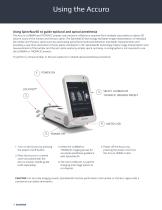
The Accuro LUMBAR and THORACIC presets use ultrasonic reflections acquired from multiple scan planes to obtain 3D volume scans of the lumbar and thoracic spine. The SpineNav3D technology facilitates image interpretation of individual 2D lumbar and thoracic spine scans by automating spinal bone landmark detection and depth measurements and providing a real-time assessment of scan plane orientation in 3D. SpineNav3D technology makes image interpretation and measurements of the lumbar and thoracic spine anatomy simple, quick, and easy. A sonographer is not required to use the LUMBAR or THORACIC...
Open the catalog to page 16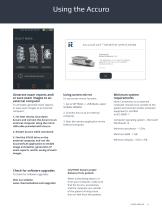
AccuroATLAS™ DESKTOP APPLICATION Generate exam reports and/ or save exam images to an external computer To annotate, generate exam reports, or save exam images to an external computer: 1. For best results, shut down Accuro and connect the Accuro to an external computer using the micro-USB cable provided with Accuro 3. Find the ATLAS drive on the external computer and run the AccuroATLAS application to enable image annotation, generation of exam reports, and/or saving of exam images. To use screen mirror function: 1. Go to SETTINGS -> USB Mode, select SCREEN MIRROR 2. Connect Accuro to an external...
Open the catalog to page 17
Accuro Maintenance Instrument care and maintenance inspection The Accuro should be inspected for physical damage and cracks prior to every use of the instrument. Stop using the Accuro if damage is noted. Failure to do so may result in electrical shock or fire. Other than the routine inspection and cleaning described in this User’s Manual, there is no periodic or preventive maintenance required for Accuro. There are no components that require periodic testing or calibration for performance assurance. Disinfecting procedures Cleaning procedure If the instrument needs to be disinfected, use a dampened...
Open the catalog to page 18All Rivanna Medical catalogs and technical brochures
 Accuro datasheet
2 Pages
 Accuro-product-flyer
2 Pages