


NanoLCTM Systems For QTRAP® Systems
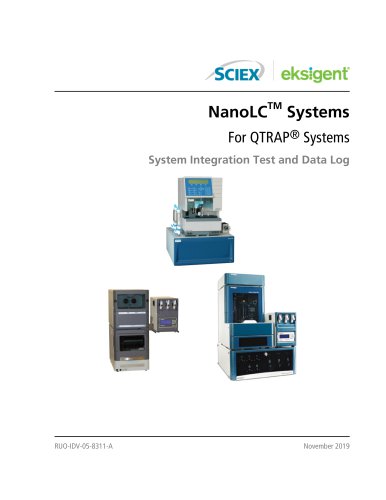
NanoLCTM Systems For QTRAP® Systems
This document serves as a comprehensive guide for conducting system integration tests on NanoLC Systems combined with QTRAP mass spectrometers. It includes detailed procedures for test preparation and execution, aimed at assessing system performance and quality control.
- Create Methods: Instructions for developing autosampler, LC, and acquisition methods.
- System Preparation: Steps for system conditioning and sample preparation.
- Perform Test: Guidelines for executing the test and evaluating results, including troubleshooting peak issues.
Templates for logging system information, peak area, retention time, and comments, along with a signoff section.
Parameters for autosampler, loading pump, and gradient pump methods for different NanoLC systems, including cHiPLC systems and external traps and columns.
Instructions for wiring and plumbing diagrams for integrating NanoLC and Tempo systems with cHiPLC systems.
Recommendations for sample preparation techniques to ensure optimal system performance.
Contact details for customer support, training opportunities, and cybersecurity considerations.
Lists of necessary components for NanoLC systems with cHiPLC and external columns, including reversed phase columns, trap columns, and ion sources.
Instructions for creating methods using Eksigent Control and Analyst Software, including plumbing the autosampler and saving configurations.
Guidelines for preparing beta-galactosidase samples, including dilutions and storage conditions.
Steps for creating and running an acquisition batch, emphasizing stable spray and proper ion source tuning.
Instructions for assessing test results, including extracting ions from MRM experiments and analyzing stable peaks.
Focus on ensuring system performance meets specifications and provides troubleshooting tips for common issues.
Procedures and specifications for conducting an LC-MS system integration test, focusing on peptide analysis from Beta-Galactosidase using NanoLCTM pre-column desalting.
- Peak Area and Retention Time Recording: Record peak areas and retention times for specified MRM transitions.
- Reproducibility: Use a column oven to stabilize temperature for improved retention time reproducibility.
- Quality Control: Compare average peak areas for QC peaks to ensure they meet minimum requirements.
- Broad or Tailing Peaks: Check for dead volumes and inspect connections.
- Lack of Separation: Ensure correct solvent delivery and check for air bubbles.
- Low Peak Intensity: Verify sample withdrawal and mass spectrometer performance.
Includes tables for pump, autosampler, cHiPLC system, A/D converter, column oven, ion source, and mass spectrometer information.
- Gradient Method Parameters: Specific parameters for cHiPLC and external systems with flow rates set to 300 nL/min.
- Autosampler Method Parameters: Detailed parameters for autosampler operations.
- Loading Pump Method Parameters: Includes gradient table tab settings.
- Wiring Information: Pin assignments for connecting NanoLC Systems with cHiPLC Systems.
- Plumbing Diagrams: Diagrams for trap-and-elute configurations.
- Maintain continuous fluid flow and perform regular system purges and calibrations.
- Use LC-MS-grade solvents and avoid Milli-Q water.
- Ensure consistent gas flow rate and pressure.
- Regularly change solutions and verify mobile phase compositions.
- Use HPLC- or MS-grade solvents and avoid non-volatile salts and buffers.
- Centrifuge samples to remove particulates and dilute samples to prevent precipitation.
Table of beta-galactosidase mass assignments, detailing charge states and molecular weights for peptide fragments.
- Contact information for customer training and support, along with links to online resources and documentation.
- Guidance on cybersecurity and access to the latest documentation versions on the SCIEX website.
Catalog excerpts
For QTRAP® Systems System Integration Test and Data Log
Open the catalog to page 1
This document is provided to customers who have purchased SCIEX equipment to use in the operation of such SCIEX equipment. This document is copyright protected and any reproduction of this document or any part of this document is strictly prohibited, except as SCIEX may authorize in writing. Software that may be described in this document is furnished under a license agreement. It is against the law to copy, modify, or distribute the software on any medium, except as specifically allowed in the license agreement. Furthermore, the license agreement may prohibit the software from being disassembled,...
Open the catalog to page 2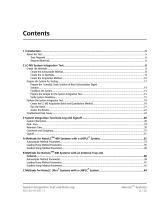
System Integration Test and Data Log RUO-IDV-05-8311-A
Open the catalog to page 3
System Integration Test and Data Log RUO-IDV-05-8311-A
Open the catalog to page 4
This guide describes the steps for preparing for and performing an LC-MS/MS system integration test for a NanoLC ® System combined with the SCIEX 4000, 4500, 5500/5500+, or 6500 QTRAP mass spectrometer. The system might ® include the cHiPLC System or an external column and one of the following NanoLC Systems: TM • NanoLC Ultra System TM • Tempo System Note: Read the safety instructions in the Operator Guide prior to running the system integration test. ® Note: For information about assembly and operation of the NanoSpray or OptiFlow Turbo V Ion Source, refer ® to the Ion Source Operator Guide....
Open the catalog to page 5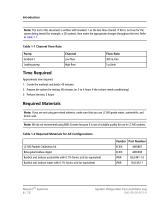
Note: The test in this document is written with Gradient 1 as the low-flow channel. If this is not true for the system being tested (for example, a 2D system), then make the appropriate changes throughout the test. Refer to Table 1-1. Table 1-1 Channel Flow Rate NanoLC™ Systems System Integration Test and Data Log
Open the catalog to page 6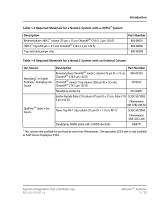
Table 1-3 Required Materials for a NanoLC System with a cHiPLC® System This column only available for purchase by users from Phenomenex. The equivalent SCIEX part is only available to Field Service Employees (FSEs).
Open the catalog to page 7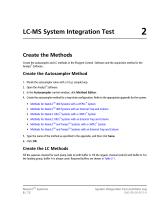
Create the autosampler and LC methods in the Eksigent Control Software and the acquisition method in the Analyst Software. 1. Plumb the autosampler valve with a 10 pL sample loop. 2. Open the Analyst® Software. 3. In the Autosampler control window, click Method Editor. 4. Create the autosampler method for a trap-elute configuration. Refer to the appropriate appendix for the system. • Methods for NanoLC™ 400 Systems with a cHiPLC® System • Methods for NanoLC™ 400 Systems with an External Trap and Column • Methods for NanoLC Ultra® Systems with a cHiPLC System • Methods for NanoLC Ultra® Systems...
Open the catalog to page 8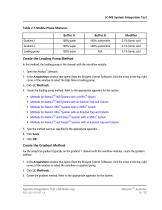
LC-MS System Integration Test Table 2-1 Mobile Phase Mixtures In this method, the loading pump is the channel with the microflow module. 1. Open the Analyst® Software. 2. In the Acquisition window that opens (from the Eksigent Control Software), click the arrow in the top, right corner of the window to select the high-flow or loading pump. 4. Create the loading pump method. Refer to the appropriate appendix for the system: • Methods for NanoLC™ 400 Systems with a cHiPLC® System • Methods for NanoLC™ 400 Systems with an External Trap and Column • Methods for NanoLC Ultra® Systems with a cHiPLC®...
Open the catalog to page 9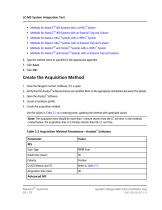
LC-MS System Integration Test • Methods for NanoLC™ 400 Systems with a cHiPLC® System • Methods for NanoLC™ 400 Systems with an External Trap and Column • Methods for NanoLC Ultra® Systems with a cHiPLC® System • Methods for NanoLC Ultra® Systems with an External Trap and Column • Methods for NanoLC™ and Tempo™ Systems with a cHiPLC® System • Methods for NanoLC™ and Tempo™ Systems with an External Trap and Column 4. Type the method name as specified in the appropriate appendix. 1. Close the Eksigent Control Software, if it is open. 2. Verify that the Analyst® Software drivers are installed. Refer...
Open the catalog to page 10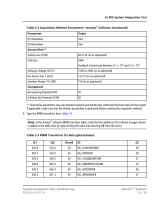
LC-MS System Integration Test Table 2-2 Acquisition Method Parameters—Analyst® Software (continued) System Integration Test and Data Log NanoLC™ Systems
Open the catalog to page 11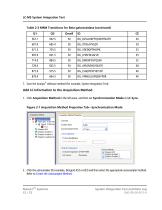
Table 2-3 MRM Transitions for Beta-galactosidase (continued) 7. Save the Analyst® software method (for example, System Integration Test). 2. Click the autosampler (for example, Eksigent AS2 or AS3) and then select the appropriate autosampler method. Refer to Create the Autosampler Method.
Open the catalog to page 12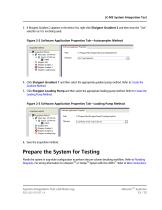
LC-MS System Integration Test 3. If Eksigent Gradient 2 appears in the device list, right-click Eksigent Gradient 2 and then clear the "Use" selection as it is not being used. Figure 2-2 Software Application Properties Tab—Autosampler Method 4. Click Eksigent Gradient 1 and then select the appropriate gradient pump method. Refer to Create the Gradient Method. 5. Click Eksigent Loading Pump and then select the appropriate loading pump method. Refer to Create the Loading Pump Method. 6. Save the acquisition method. Plumb the system in trap-elute configuration to perform the pre-column desalting...
Open the catalog to page 13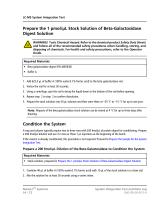
WARNING! Toxic Chemical Hazard. Refer to the chemical product Safety Data Sheets and follow all of the recommended safety procedures when handling, storing, and disposing of chemicals. For health and safety precautions, refer to the Operator Guide. 1. Add 625.0 pL of buffer A (100% water:0.1% formic acid) to the beta-galactosidase vial. 2. Vortex the vial for at least 30 seconds. 3. Using a centrifuge, spin the vial to bring the liquid down to the bottom of the vial before opening. 4. Repeat step 2 to step 3 to confirm dissolution. 5. Aliquot the stock solution into 50 pL volumes and then store...
Open the catalog to page 14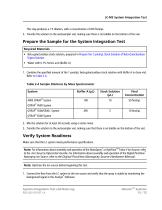
LC-MS System Integration Test This step produces a 1:5 dilution, with a concentration of 200 fmol/pL. 3. Transfer the solution to the autosampler vial, making sure there is no bubble on the bottom of the vial. Required Materials • Beta-galactosidase stock solution, prepared in Prepare the 1 pmol/pL Stock Solution of Beta-Galactosidase Digest Solution • Water with 0.1% formic acid (Buffer A) 1. Combine the specified amount of the 1 pmol/pL beta-galactosidase stock solution with Buffer A in clean vial. Refer to Table 2-4. Table 2-4 Sample Dilutions by Mass Spectrometer 2. Mix the solution for at...
Open the catalog to page 15All SCIEX catalogs and technical brochures
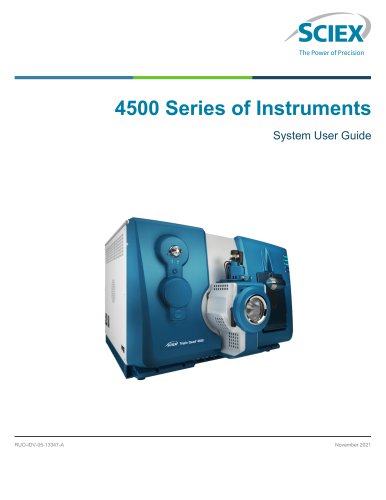 4500 Series of Instruments
65 Pages
Archived catalogs
 Brochure: AB SCIEX TOF/TOF? 5800
12 Pages
 Brochure: Discovery Proteomics
12 Pages
 Brochure: Targeted Protein Quant
12 Pages
 AB SCIEX TripleTOF® 5600+ System
12 Pages
 MetabolitePilot Software
6 Pages
 MultiQuant Software
6 Pages
 ProteinPilot Software
6 Pages
 Micro LC and cHiPLC Columns
6 Pages
 Ekspert NanoLC 400
7 Pages
 Eksigent Ultra LC Systems
6 Pages
 PA 800 plus Catalog
16 Pages
 ExionLC 100 Extended Specs
2 Pages
 SCIEX TRIPLE QUAD™ 5500 SYSTEM
12 Pages
 x500R
x500R8 Pages
 SelexION™
26 Pages
 MicroLC 200 Plus
6 Pages
 3200MD
8 Pages
 API 3200™ LC-MS/MS SYSTEM
8 Pages
 NanoLC™ 400
8 Pages
 MPX™
MPX™13 Pages
 SCIEX VISION
32 Pages
 SelexION
8 Pages


- Solvent reagent
- Molecular biology reagent
- SCIEX analysis software
- Visualization software
- Quality control reagent
- Reporting software
- Windows software
- SCIEX laboratory software
- Monitoring software
- Automated software
- Acquisition software
- Traceability software
- Software module
- Benchtop spectrometer
- SCIEX chromatography system
- DNA cleanup reagent
- Research software
- Calibration reagent