


ZenoTOF 7600 system
ZenoTOF 7600 system
This technical note introduces an integrated workflow for the analysis of intact and subunit monoclonal antibodies (mAbs) using the Biologics Explorer software and the ZenoTOF 7600 system. The software provides confident deconvolution results and visualization tools for impurity assessment and batch comparisons.
Key Features of Biologics Explorer Software
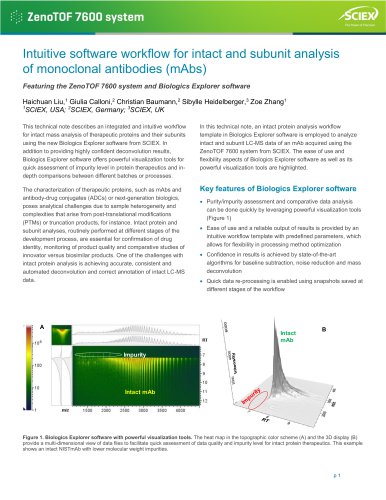
- Quick impurity assessment and comparative data analysis using visualization tools.
- Intuitive workflow template with predefined parameters for ease of use and reliable results.
- State-of-the-art algorithms for baseline subtraction, noise reduction, and mass deconvolution.
- Quick data re-processing with snapshots saved at different workflow stages.
Methods
Sample preparation involved diluting NISTmAb for intact analysis and denaturing it for subunit analysis. Chromatography was performed using reversed-phase liquid chromatography, and mass spectrometry data was acquired using the ZenoTOF 7600 system. Data processing was conducted with Biologics Explorer software using the IntactProtein_Automated template.
Intact Protein Workflow Template
The workflow template provides a starting point for analyzing SCIEX data with minimal user input. It allows for stepwise or automatic execution, facilitating parameter optimization. Pre-processed information and annotated results can be saved for future use.
Data Visualization
The software offers heat maps and 3D displays for data quality assessment and impurity detection. Visualization tools helped identify a low-abundant impurity in the NISTmAb sample.
Deconvolution of QTOF-MS Raw Data
Spectrum deconvolution is performed using a maximum entropy method. The process includes baseline subtraction, smoothing, and peak detection, with adjustable settings for peak detection strategies.
Protein Mapping and Peak Annotation
Detected peaks are annotated by matching sequences and modifications. Glycosylation libraries and disulfide bond states are available to expedite analysis. Excellent mass accuracies were achieved for major species.
Data Review and Reporting
Visualization tools allow for comparison of deconvoluted data from multiple files. Annotated peaks can be accepted or rejected for automatic abundance calculations. Customized PDF reports can be generated.
Conclusions
- The workflow template provides ease of use and flexibility in parameter optimization.
- Visualization tools enable quick impurity assessment and sample quality evaluation.
- Proven algorithms ensure consistent and confident results.
Catalog excerpts
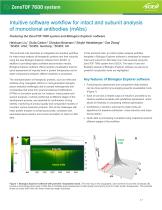
ScTex) The Power of Precision Intuitive software workflow for intact and subunit analysis of monoclonal antibodies (mAbs)Featuring the ZenoTOF 7600 system and Biologics Explorer softwareHaichuan Liu,1 Giulia Calloni,2 Christian Baumann,2 Sibylle Heidelberger,3 Zoe Zhang1 1SCIEX, USA; 2SCIEX, Germany; 3SCIEX, UK This technical note describes an integrated and intuitive workflow for intact mass analysis of therapeutic proteins and their subunits using the new Biologics Explorer software from SCIEX. In addition to providing highly confident deconvolution results, Biologics Explorer software offers powerful visualization tools for quick assessment of impurity level in protein therapeutics and indepth comparisons between different batches or processes. The characterization of therapeutic proteins, such as mAbs and antibody-drug conjugates (ADCs) or next-generation biologics, poses analytical challenges due to sample heterogeneity and complexities that arise from post-translational modifications (PTMs) or truncation products, for instance. Intact protein and subunit analyses, routinely performed at different stages of the development process, are essential for confirmation of drug identity, monitoring of product quality and comparative studies of innovator versus biosimilar products. One of the challenges with intact protein analysis is achieving accurate, consistent and automated deconvolution and correct annotation of intact LC-MS data. In this technical note, an intact protein analysis workflow template in Biologics Explorer software is employed to analyze intact and subunit LC-MS data of an mAb acquired using the ZenoTOF 7600 system from SCIEX. The ease of use and flexibility aspects of Biologics Explorer software as well as its powerful visualization tools are highlighted. Key features of Biologics Explorer software • Purity/impurity assessment and comparative data analysis can be done quickly by leveraging powerful visualization tools (Figure 1) • Ease of use and a reliable output of results is provided by an intuitive workflow template with predefined parameters, which allows for flexibility in processing method optimization • Confidence in results is achieved by state-of-the-art algorithms for baseline subtraction, noise reduction and mass deconvolution • Quick data re-processing is enabled using snapshots saved at different stages of the workflow Figure 1. Biologics Explorer software with powerful visualization tools. The heat map in the topographic color scheme (A) and the 3D display (B) provide a multi-dimensional view of data files to facilitate quick assessment of data quality and impurity level for intact protein therapeutics. This example shows an intact NISTmAb with lower molecular weight impurities.
Open the catalog to page 1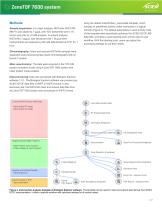
scTex) The Power of Precision Methods Sample preparation: For intact analysis, NISTmAb (NIST RM #8671) was diluted to 1 pg/pL with 10% acetonitrile and 0.1% formic acid prior to LC-MS analysis. In subunit analysis, NISTmAb (1 pg/pL) was denatured with 7 M guanidine hydrochloride and reduced by 200 mM dithiothreitol at 37°C for 1 hour. Chromatography: Intact and reduced NISTmAb samples were separated using reversed-phase liquid chromatography with an ExionLC system. Mass spectrometry: The data were acquired in the TOF-MS positive ionization mode using a ZenoTOF 7600 system with intact protein...
Open the catalog to page 2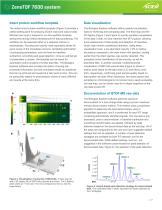
Intact protein workflow template Data visualization The default intact protein workflow template (Figure 2) provides a useful starting point for analyzing SCIEX intact and subunit data. Minimal user input is required to run this workflow template, saving time during method development for data processing. The workflow can be executed either in a stepwise manner or automatically. Running each activity node separately allows for quick review of the immediate outcome, facilitating optimization of processing parameters, such as those for baseline subtraction, smoothing and peak detection. Once an...
Open the catalog to page 3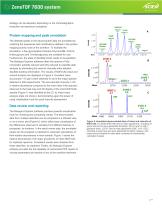
strategy can be adjusted, depending on the chromatographic resolution and spectrum complexity. Protein mapping and peak annotation The detected peaks in the deconvoluted data are annotated by matching the sequences and modifications defined in the protein mapping activity node of the workflow. To facilitate the annotation, a few glycosylation libraries (GlycomeDB, CHO Nlinked glycans and O-linked glycans) are available for use. Furthermore, the state of disulfide bonds needs to be specified. The Biologics Explorer software offers the options of fully connected, partially reduced and fully reduced...
Open the catalog to page 4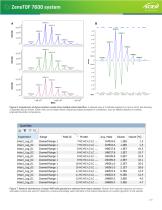
Figure 6. Comparison of deconvolution results from multiple intact data files. A stacked view of 3 replicate injections (A) and a mirror plot showing 2 replicates (B) are shown. Either view can be helpful when comparing multiple samples for consistency, such as different batches or making originator/biosimilar comparisons. Figure 7. Relative abundances of major NISTmAb glycoforms obtained from intact analysis. Results from replicate injections are shown. Calculated volume was used for obtaining a volume percentage value indicative of the relative abundance of a certain glycoform in the sample....
Open the catalog to page 5
Conclusions • An intuitive intact workflow template for analyzing intact and subunit data of protein therapeutics provides ease of use while allowing significant flexibility in optimizing parameters. • Powerful visualization tools enable quick assessment of impurity level and the quality of samples and data as well as the comparative analysis of multiple samples from different batches or processes. • The proven algorithms for baseline subtraction, smoothing and noise reduction as well as spectrum deconvolution and peak detection ensure consistent and confident results. The SCIEX clinical diagnostic...
Open the catalog to page 6All SCIEX catalogs and technical brochures
 SCIEX 4500MD system
9 Pages
Archived catalogs
 4500 Series of Instruments
65 Pages
 Brochure: AB SCIEX TOF/TOF? 5800
12 Pages
 Brochure: Discovery Proteomics
12 Pages
 Brochure: Targeted Protein Quant
12 Pages
 AB SCIEX TripleTOF® 5600+ System
12 Pages
 MetabolitePilot Software
6 Pages
 MultiQuant Software
6 Pages
 ProteinPilot Software
6 Pages
 Micro LC and cHiPLC Columns
6 Pages
 Ekspert NanoLC 400
7 Pages
 Eksigent Ultra LC Systems
6 Pages
 PA 800 plus Catalog
16 Pages
 ExionLC 100 Extended Specs
2 Pages
 SCIEX TRIPLE QUAD™ 5500 SYSTEM
12 Pages
 x500R
8 Pages
 SelexION™
26 Pages
 MicroLC 200 Plus
6 Pages
 3200MD
8 Pages
 API 3200™ LC-MS/MS SYSTEM
8 Pages
 NanoLC™ 400
8 Pages
 MPX™
13 Pages
 SCIEX VISION
32 Pages
 SelexION
8 Pages


- Solvent reagent
- Molecular biology reagent
- Research reagent
- SCIEX analysis software
- Laboratory reagent
- Protein reagent
- Dye reagent kit
- Visualization software
- Control software
- Quality control reagent
- Reporting software
- Acquisition software
- Windows software
- SCIEX laboratory software
- SCIEX spectrometer
- Monitoring software
- Automated software
- Magnetic bead-based reagent
- Electrolyte reagent
- Software module
 鄂公网安备42018502009510号 -