
- Catalogs
- Sekisui Diagnostics LLC
- INFLUENZA A&B TEST WITH THE ACUCY SYSTEM

- Products
- Catalogs
- News & Trends
- Exhibitions
INFLUENZA A&B TEST WITH THE ACUCY SYSTEM

INFLUENZA A&B TEST WITH THE ACUCY SYSTEM
Catalog excerpts

INFLUENZA A&B TEST INSTRUCTIONS FOR USE
Open the catalog to page 1
INFLUENZA A&B TEST WITH THE ACUCY SYSTEM For use with nasal or nasopharyngeal swab specimens. CLIA COMPLEXITY: WAIVED A Certificate of Waiver is required to perform this test in a CLIA Waived environment. To obtain CLIA waiver information and a Certificate of Waiver, contact your state health department. Additional information is available at www.cms.hhs.gov/CLIA. INTENDED USE The Acucy™ Influenza A&B Test for the rapid qualitative detection of influenza A&B is composed of a rapid chromatographic immunoassay for the direct and qualitative detection of influenza A and B viral nucleoprotein antigens...
Open the catalog to page 3
PRINCIPLE OF THE PROCEDURE The Acucy Influenza A&B Test allows for the differential detection of influenza A and influenza B antigens, when used with the Acucy Reader. The patient sample is placed in the Extraction Buffer vial, during which time the virus particles in the sample are disrupted, exposing internal viral nucleoproteins. After disruption, the sample is dispensed into the Test Cassette sample well. From the sample well, the sample migrates along the membrane surface. If influenza A or B viral antigens are present, they will form a complex with mouse monoclonal antibodies to influenza...
Open the catalog to page 4
• For In vitro diagnostic use only. • Federal Law restricts this device to sale by or on the order of a licensed practitioner. • Do not use the kit contents beyond the expiration date printed on the outside of the box. • To obtain accurate results, the Instructions For Use must be followed. • Swabs, Extraction Buffer vials, Extraction vials dropper tips, and Test Cassettes are for single use only (do not reuse). • Do not interchange or mix components from different kit lots. • Follow your clinical and/or laboratory safety guidelines in the collection, handling, storage and disposal of patient...
Open the catalog to page 5
NOTE: If the CAL-Device has reached its expiration dating, a new Calibration Device can be purchased from a distribution retailer. (Acucy Calibration Device Catalog # 1031) If the Calibration Device has been damaged or is not working properly, contact Sekisui Diagnostics Technical Support at 800-332-1042 (U.S. Only) or 781-652-7800 (outside the U.S.). NOTE: If the Calibration does not pass, notify the on-site Supervisor or contact Sekisui Diagnostics Technical Support for assistance at 800-332-1042 (U.S. Only) or 781-652-7800 (outside the U.S.). Test Cassette Built-In Internal Control The Acucy...
Open the catalog to page 6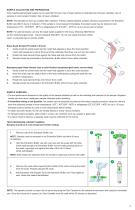
SAMPLE COLLECTION AND PREPARATION Only nasal/nasopharyngeal swabs can be used with this test. Use of nasal washes or aspirates has not been validated. Use of samples in viral transport medium has not been validated. NOTE: Test samples as soon as possible after collection. Freshly collected patient samples should be processed in the Extraction Buffer vial within 6 hours of collection. If the sample is not processed immediately, the patient swab may be stored at room temperature (15℃ - 30℃/59℉ - 86℉) or refrigerated (2℃-8℃/36℉ – 46℉) for up to 6 hours prior to testing. NOTE: For optimal results,...
Open the catalog to page 7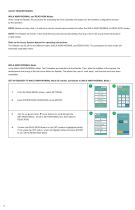
ACUCY READER MODES WALK AWAY/NORMAL and READ NOW Modes When using the Reader, the procedure for evaluating the Test Cassettes will depend on the workflow configuration chosen by the operator. NOTE: Before running a test, it is critical to use the correct test procedure for either the WALK AWAY/NORMAL or READ NOW modes. NOTE: The Reader will remain in the mode that was last used during testing. Running a test in the wrong mode will produce invalid results. Refer to the Acucy System Manual for operating instructions. The Reader may be set to two different modes (WALK AWAY/NORMAL and READ NOW)....
Open the catalog to page 8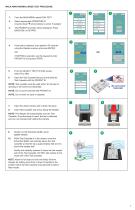
WALK AWAY/NORMAL MODE TEST PROCEDURE From the MAIN MENU select RUN TEST Select appropriate OPERATOR ID (Use the down t arrow buttons to scroll, if needed) MAIN MENU RUN TEST The PATIENT ID screen will be displayed. Press BARCODE or KEYPAD. SELEC T PATIENT ID input method BARCODE KEYPAD 11 days until CALIBRATION is required QC TEST required before RUN TEST can be selected If barcode is selected, scan patient’s ID barcode using the Reader scanner and press ENTER. If KEYPAD is selected, use the keypad to enter PATIENT ID and press ENTER. From the SELECT TEST TO RUN screen, select FLU A&B. S c a...
Open the catalog to page 9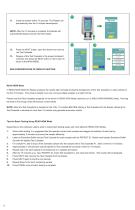
Close the drawer within 10 seconds. The Reader will automatically time the 15-minute development. TEST NAME FLU A&B O P E R AT O R I D SUSAN PAT I E N T I D 99114628 Add sample drops to sam ple we ll. Close the drawer within 15 seconds. NOTE: After the 15 minutes is complete, the Reader will automatically display and print the test results. Press the NEXT button, open the drawer and remove the Test Cassette. Dispose of the Test Cassette in the proper biohazard container and press the NEXT button on the screen to return to the MAIN MENU. MAIN MENU Remove the test cassette from the drawer Press...
Open the catalog to page 10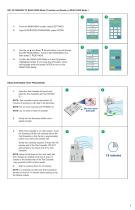
SET-UP READER TO READ NOW Mode (If needed, set Reader to READ NOW Mode.) 2 INPUT SUPERVISOR PASSWORD THEN PRESS ENTER MAIN MENU RUN TEST From the MAIN MENU screen, select SETTINGS. Input SUPERVISOR PASSWORD, press ENTER. 4 MENU SETTINGS MENU 2/4 Use the up s and down t arrow buttons to scroll through the SETTINGS MENU. Scroll to SETTING MENU 2/4, then select 5. READ NOW. 11 days until CALIBRATION is required QC TEST required before RUN TEST can be selected Confirm the READ NOW Mode is in the ON position (highlighted white). If not, press the ON button, which will highlight white and press ENTER...
Open the catalog to page 11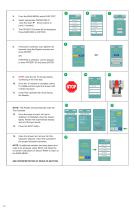
From the MAIN MENU select RUN TEST Select appropriate OPERATOR ID (Use the down t arrow buttons to scroll, if needed) MAIN MENU The PATIENT ID screen will be displayed. Press BARCODE or KEYPAD. BARCODE KEYPAD 11 days until CALIBRATION is required QC TEST required before RUN TEST can be selected If barcode is selected, scan patient’s ID barcode using the Reader scanner and press ENTER. OR If KEYPAD is selected, use the keypad to enter PATIENT ID and press ENTER. S c a n PAT I E N T I D then press ENTER BACK SPACE STOP: Wait the full 15 minutes before continuing to the next step. Once the 15 minutes...
Open the catalog to page 12All Sekisui Diagnostics LLC catalogs and technical brochures
 ACETAMINOPHEN L3K® ASSAY
48 Pages