

LuMon™ System Quick Reference Guide
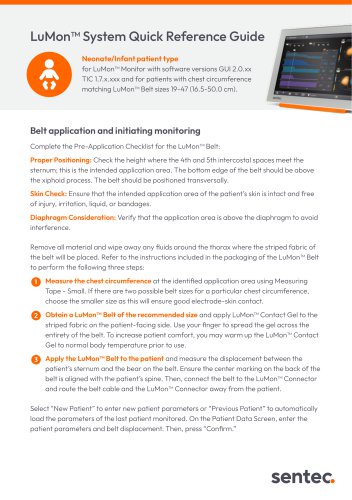
LuMon™ System Quick Reference Guide
This document provides guidelines for using the LuMon™ Monitor with software versions GUI 2.0.xx and TIC 1.7.x.xxx for neonate/infant patients. It includes instructions for belt application, monitoring initiation, and troubleshooting.
Specifications
The LuMon™ Monitor is compatible with patients whose chest circumference matches LuMon™ Belt sizes 19-47 (16.5-50.0 cm).
Belt Application and Monitoring Initiation
- Ensure proper positioning at the 4th and 5th intercostal spaces, above the xiphoid process, and transversally.
- Check skin integrity and ensure the area is free of injury or bandages.
- Measure chest circumference and select the appropriate belt size, preferring a snug fit for optimal electrode contact.
- Apply LuMon™ Contact Gel to the belt and ensure proper alignment with the patient's spine.
- Enter patient data into the monitor and confirm settings.
Setup Verification
- Check belt time remaining and replace as needed.
- Ensure correct belt positioning and snug fit without restricting breathing.
- Verify patient data entries and monitor display settings.
- Ensure good electrode contact and proper breath detection.
Monitoring
- Maintain stable belt-to-skin contact and monitor breath detection.
- Configure external devices if connected and monitor real-time values.
- Use live and trended screens for data analysis.
Troubleshooting
- Improve belt-to-skin contact by applying more gel or adjusting the belt.
- Address issues with breath detection by checking for interference or incorrect positioning.
Ending Monitoring
- Disconnect and dispose of the single-use LuMon™ Belt according to regulations.
- Clean and disinfect the monitor and connector.
Warnings
- The system should be operated by trained personnel who have read and understood all instructions and precautions.
- The LuMon™ System is an adjunct tool and not intended for diagnosis.
For further information, refer to the LuMon™ System Instructions for Use at www.sentec.com/product-support/eit/.
Catalog excerpts
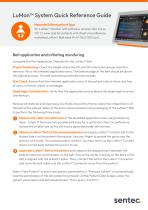
LuMon™ System Quick Reference Guide Neonate/Infant patient type for LuMon™ Monitor with software versions GUI 2.0.xx TIC 1.7.x.xxx and for patients with chest circumference matching LuMon™ Belt sizes 19-47 (16.5-50.0 cm). Belt application and initiating monitoring Complete the Pre-Application Checklist for the LuMon™ Belt: Proper Positioning: Check the height where the 4th and 5th intercostal spaces meet the sternum; this is the intended application area. The bottom edge of the belt should be above the xiphoid process. The belt should be positioned transversally. Skin Check: Ensure that the intended application area of the patient’s skin is intact and free of injury, irritation, liquid, or bandages. Diaphragm Consideration: Verify that the application area is above the diaphragm to avoid interference. Remove all material and wipe away any fluids around the thorax where the striped fabric of the belt will be placed. Refer to the instructions included in the packaging of the LuMon™ Belt to perform the following three steps: 1 Measure the chest circumference at the identified application area using Measuring Tape - Small. If there are two possible belt sizes for a particular chest circumference, choose the smaller size as this will ensure good electrode-skin contact. Obtain a LuMon™ Belt of the recommended size and apply LuMon™ Contact Gel to the striped fabric on the patient-facing side. Use your finger to spread the gel across the entirety of the belt. To increase patient comfort, you may warm up the LuMon™ Contact Gel to normal body temperature prior to use. Apply the LuMon™ Belt to the patient and measure the displacement between the patient’s sternum and the bear on the belt. Ensure the center marking on the back of the belt is aligned with the patient’s spine. Then, connect the belt to the LuMon™ Connector and route the belt cable and the LuMon™ Connector away from the patient. Select “New Patient” to enter new patient parameters or “Previous Patient” to automatically load the parameters of the last patient monitored. On the Patient Data Screen, enter the patient parameters and belt dis
Open the catalog to page 1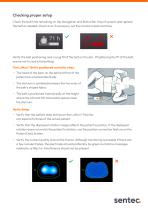
Check the belt time remaining on the Navigation and Status Bar (top of screen) and replace the belt as needed. Check and, if necessary, set the monitor's date and time. Verify the belt positioning and a snug fit of the belt on the skin. If tightening the fit of the belt, ensure not to restrict breathing. The LuMon™ Belt is positioned correctly when: • The head of the bear on the belt and that of the patient are oriented identically • The sternum is centered between the two ends of the belt's striped fabric • The belt is positioned transversally at the height where the 4th and 5th intercostal...
Open the catalog to page 2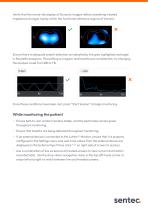
Verify that the movie-like display of Dynamic Images reflects breathing-related impedance changes mainly within the functional reference regions of interest. Ensure there is adequate breath detection as indicated by the grey highlighted rectangle in the plethysmogram. If breathing is irregular and breaths are not detected, try changing the analysis mode from BB to TB. Once these conditions have been met, press “Start Session” to begin monitoring. • Ensure belt-to-skin contact remains stable, and the electrodes remain green throughout monitoring. • Ensure that breaths are being detected throughout...
Open the catalog to page 3
To resolve belt to skin contact quality issues, apply additional LuMon™ Contact Gel to the LuMon™ Belt, tighten the belt, and/or remove items (bandages, sensors) between the belt and skin. Issues with breath detection and images outside of the functional reference regions of interest could be explained by poor belt-to-skin contact quality, interference from other devices, patient motion, atypical anatomy, and incorrect belt position. Consult the Instructions for Use for more information. • Disconnect the disposable LuMon™ Belt from the reusable LuMon™ Connector. • LuMon™ Belts are single-use....
Open the catalog to page 4All Sentec catalogs and technical brochures
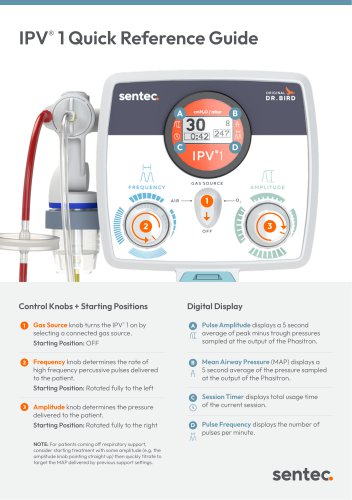 IPV® 1 Quick Reference Guide
6 Pages
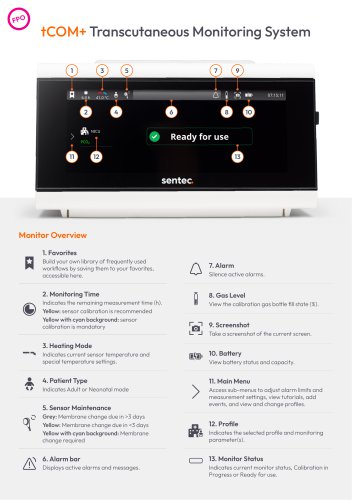 tCOM+ Bedside Tip Sheet
2 Pages
- Patient monitor
- Multi-parameter monitor
- Intensive care patient monitor
- Multi-parameter O2 monitor
- Pulse oximetry multi-parameter monitor
- Clinical patient monitor
- Respiratory frequency patient monitor
- Critical care multi-parameter monitor
- CO2 multiparameter monitor
- Continuous patient monitor
- Multi-parameter monitor with touchscreen
- Patient monitor with touchscreen
- Portable multi-parameter monitor
- Heart rate multiparameter monitor
- Continuous multi-parameter monitor
- Clinical multi-parameter monitor
- Bedside multi-parameter monitor
- Multi-parameter monitor with integrated battery
- Non-invasive multi-parameter monitor
- Anesthesia patient monitor