

tCOM+ Bedside Tip Sheet
tCOM+ Bedside Tip Sheet
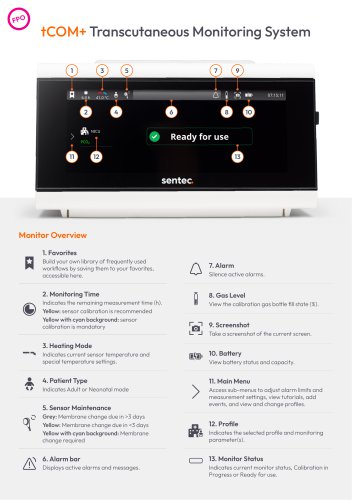
- Favorites: Users can save frequently used workflows for easy access.
- Monitoring Time: Displays remaining measurement time. Sensor calibration is recommended or mandatory based on color indicators.
- Heating Mode: Shows current sensor temperature and special settings.
- Patient Type: Indicates whether the monitor is in Adult or Neonatal mode.
- Sensor Maintenance: Alerts for membrane change based on color indicators.
- Alarm Bar: Displays active alarms and messages.
- Alarm Silence: Option to silence active alarms.
- Gas Level: Shows calibration gas bottle fill state.
- Screenshot: Allows taking a screenshot of the current screen.
- Battery: Displays battery status and capacity.
- Main Menu: Access to sub-menus for various settings and tutorials.
- Profile: Shows selected profile and monitoring parameters.
- Monitor Status: Indicates if the monitor is ready for use or in calibration.
- Touch Gestures: Includes swipe, pinch, and long press for data interaction.
- Alarms: Set and adjust alarm limits.
- Profile Selection: Choose preconfigured measurement profiles.
- Audio: Adjust alarm volume.
- Baselines: View and set baselines.
- Measurement Settings: Adjust parameters, site time, and temperature.
- Display: Adjust brightness and enable sleep mode.
- Trend Settings: Modify trend range and time scale.
- Review & Export: View and export screenshots and data.
- Events: Log interventions as events.
- Advanced Settings: Edit profiles and adjust system settings.
- Tutorials: Instructions for common workflows.
- System Information: View monitor and sensor-related information.
- Sensor Maintenance: Calibrate sensor, confirm membrane change, and initiate a Sensitivity Test.
- Sensor Components: Includes silver ring, dried electrolyte, membrane presence, and appearance indicators.
Catalog excerpts
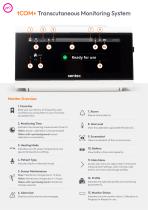
tCOM+ Transcutaneous Monitoring System 1 Monitor Overview 1. Favorites Build your own library of frequently used workflows by saving them to your favorites, accessible here. Indicates the remaining measurement time (h). Yellow: sensor calibration is recommended Yellow with cyan background: sensor calibration is mandatory Silence active alarms. View the calibration gas bottle fill state (%). 9. Screenshot Take a screenshot of the current screen. Indicates current sensor temperature and special temperature settings. Indicates Adult or Neonatal mode Grey: Membrane change due in >3 days Yellow: Membrane change due in <3 days Yellow with cyan background: Membrane change required View battery status and capacity. Access sub-menus to adjust alarm limits and measurement settings, view tutorials, add events, and view and change profiles. 12. Profile Indicates the selected profile and monitoring parameter(s). Displays active alarms and messages. Indicates current monitor status, Calibration in Progress or Ready for use.
Open the catalog to page 1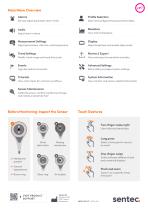
Main Menu Overview Alarms Profile Selection Set and adjust parameter alarm limits Select preconfigured measurement profiles Adjust alarm volume Measurement Settings Adjust parameters, site time, and temperature Adjust brightness and enable sleep mode Trend Settings Review & Export Modify trend range and trend time scale View and export screenshots and data Advanced Settings Edit profiles and adjust system settings System Information View instructions for common workflows View monitor and sensor-related information Sensor Maintenance Calibrate sensor, confirm membrane change, and initiate a Sensitivity...
Open the catalog to page 2All Sentec catalogs and technical brochures
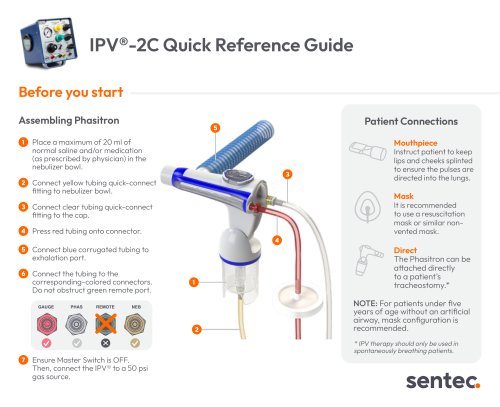
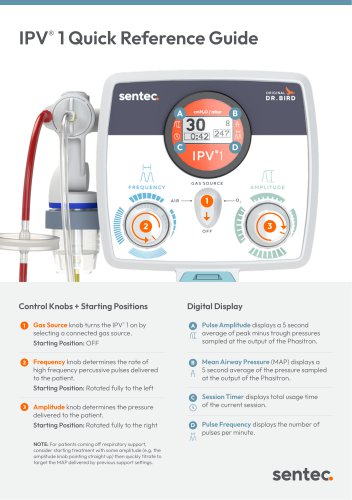 IPV® 1 Quick Reference Guide
6 Pages
- Patient monitor
- Multi-parameter monitor
- Intensive care patient monitor
- Multi-parameter O2 monitor
- Pulse oximetry multi-parameter monitor
- Clinical patient monitor
- Respiratory frequency patient monitor
- Critical care multi-parameter monitor
- CO2 multiparameter monitor
- Multi-parameter monitor with touchscreen
- Continuous patient monitor
- Patient monitor with touchscreen
- Portable multi-parameter monitor
- Heart rate multiparameter monitor
- Clinical multi-parameter monitor
- Continuous multi-parameter monitor
- Non-invasive multi-parameter monitor
- Bedside multi-parameter monitor
- Multi-parameter monitor with integrated battery
- Anesthesia patient monitor