

- Company
- Products
- Catalogs
- News & Trends
- Exhibitions
User Manual
1 /28Pages

User Manual
1 /28Pages
Catalog excerpts

ScoliMatrix 3D Detection System User Manual
Open the catalog to page 1
‘Please read the "User Manual" and "Warranty Terms" carefully before use! If you have any questions about ScoliMatrix3D Detection System, please contact us promptly.
Open the catalog to page 2
8. Operating,Storage, and Transport Conditions------- 11-12 14. Interpretation of Warning Statements and Symbols —- 20 Appendix 1: Certificate of Compliance for ---------------------22 Appendix 2: Warranty Card for_____________________________________23
Open the catalog to page 3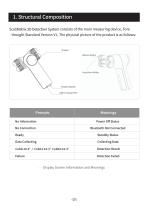
Display Screen Information and Meanings
Open the catalog to page 4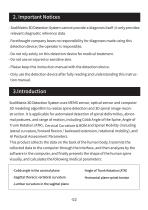
- ScoliMatrix3D Detection System cannot provide a diagnosis itself; it only provides relevant diagnostic reference data. - Forethought company bears no responsibility for diagnoses made using this detection device; the operator is responsible. - Do not rely solely on this detection device for medical treatment. - Do not use on injured or sensitive skin. - Please keep this instruction manual with the detection device. - Only use the detection device after fully reading and understanding this instruction manual. ScoliMatrix3D Detection System uses MEMS sensor, optical sensor and computer 3D modeling...
Open the catalog to page 5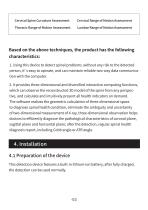
Cervical Spine Curvature Assessment Cervical Range of Motion Assessment Thoracic Range of Motion Assessment Lumbar Range of Motion Assessment 1. Using this device to detect spinal problems .without any risk to the detected person, it’s easy to operate, and can maintain reliable two-way data communication with the computer. 2. It provides three-dimensional and diversified interactive computing functions, which can observe the reconstructed 3D model of the spine from any perspective, and calculate and intuitively present all health indicators on demand. The software realizes the geometric calculation...
Open the catalog to page 6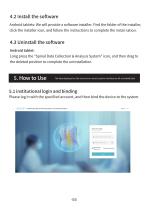
Android tablets: We will provide a software installer. Find the folder of the installer, click the installer icon, and follow the instructions to complete the instal- lation. Android tablet: Long press the "Spinal Data Collection & Analysis System" icon, and then drag to the deleted position to complete the uninstallation. The data displayed on the instruction manual system interface are all simulated data 5.1 institutional login and binding Please log in with the specified account, and then bind the device to the system.
Open the catalog to page 7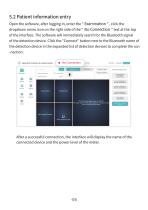
Open the software, after logging in, enter the" Examination", click the dropdown arrow icon on the right side of the" No Connection " text at the top of the interface. The software will immediately search for the Bluetooth signal of the detection device. Click the "Connect" button next to the Bluetooth name of the detection device in the expanded list of detection devices to complete the con -nection. Operator: CaiQiang i Spinal Data Collection & Analysis System After a successful connection, the interface will display the name of the connected device and the power level of the meter.
Open the catalog to page 8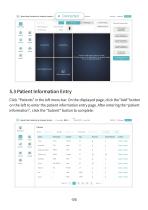
Spinal Data Collection & Analysis System • Connected ^ Operator: CaiQiang Cervical Spine Curvature Assessment Cervical Range of Motion Assessment Thoracic Range of Motion Assessment Lumbar Range of Motion Assessment 5.3 Patient Information EntryClick "Patients" in the left menu bar. On the displayed page, click the "Add" button on the left to enter the patient information entry page. After entering the "patient information", click the "Submit" button to complete.Spinal Data Collection & Analysis System • Connected S9<?°/ Organization; branchTest Operator: CaiQiang Lilian Aaaassss Lilian11111...
Open the catalog to page 9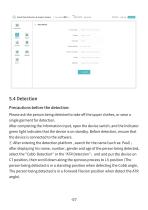
(Js) Spinal Data Collection & Analysis System • Connected v' Organization: branchTest Operator: CaiQiang • ID Number Please enter your ID Numb Settings Upgrade * Name patient name * Gender Select * Date of Birth | O Select Date Phone Number Please Enter Phone Numbe Email Please enter your email adi Address Please enter the detailed a Please ask the person being detected to take off the upper clothes, or wear a single garment for detection. After completing the information input, open the device switch, and the indicator green light indicates that the device is on standby. Before detection, ensure...
Open the catalog to page 10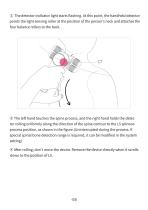
© The detector indicator light starts flashing. At this point, the handheld detector points the light sensing roller at the position of the person's neck and attaches the four balance rollers to the back. ® The left hand touches the spine process, and the right hand holds the detector rolling uniformly along the direction of the spine contour to the L5 spinous process position, as shown in the figure.(Uninterrupted during the process, if special spinal bone detection range is required, it can be modified in the system setting) ® After rolling, don't move the device. Remove the device directly...
Open the catalog to page 11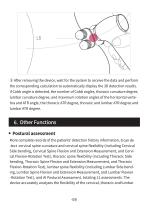
® After removing the device, wait for the system to receive the data and perform the corresponding calculation to automatically display the 3D detection results. If Cobb angle is detected, the number of Cobb angles, thoracic curvature degree, lumbar curvature degree, and maximum rotation angles of the horizontal vertebra and ATR angle, the thoracic ATR degree, thoracic and lumbar ATR degree and lumbar ATR degree. More complete records of the patients'detection history information, It can de -tect cervical spine curvature and cervical spine flexibility (including Cervical Side bending, Cervical...
Open the catalog to page 12
spine, as well as overall body balance, providing users with comprehensive health evaluation and intervention guidance. The software will save the uploaded posture images for the person being detected, provide more reference information. Click the "Posture images" or "X-ray images" button on the detection table interface to enter. It is used to compare the imaging results before and after detection, so as to provide diagnostic reference during patient review, Click the "Image comparison" button on the detection table interface to enter. After the detection is completed, we can generate the Spine...
Open the catalog to page 13All Shanghai Forethought Medical Technology catalogs and technical brochures
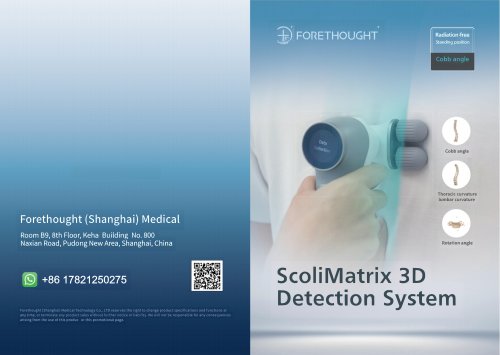 ScoliMatrix 3D Detection System
12 Pages

- Analysis software
- Tablet computer software
- Tablet PC software
- Reporting software
- Diagnostic software
- Cloud-based software
- Automated software
- Capture software
- AI-assisted software
- Artificial intelligence software
- Measurement software
- Real-time software
- Screening software
- Physiotherapy software
- Body software
- Motion assessment system
- Custom-made software
- Healthcare facility software
- Computerized assessment system
- Spine software