
- Catalogs
- SoftGenetics, LLC.
- GeneMarker®

GeneMarker®

GeneMarker®
- Saturation Correction: Creates synthetic peaks for saturated data points.
- Baseline Subtraction: Removes baseline noise for clearer data representation.
- Pull-up Correction: Eliminates peaks caused by bleed-through.
- Spike Correction: Removes peaks from voltage spikes due to micro-air bubbles or debris.
- Stutter Peak Correction: Filters out stutter peaks from PCR slippage.
- PC: Windows OS (XP, Vista, 7, or 8), Pentium III, 1 GHz processor, 128MB RAM, 20GB hard disk space.
- Mac: OS 10.4.6 with Parallels desktop or Apple Boot Camp, 2GB RAM, 20GB hard disk space.
Catalog excerpts

Unique Tools to Increase Genotyping Speed and Accuracy Compatible with all Major Sequencing Systems Embedded Applications Eliminate Data Transfer
Open the catalog to page 1
GeneMarker® is unique genotyping software that has been designed to provide genetic researchers with a “biologist friendly” genotyping tool. The program’s linked-navigation and intuitive layout make it easy to use, while its accuracy, speed, and extensive collection of post-genotypic applications make it a powerful research tool. These features are summarized below: Ease of Use Accurate Size/Allele Calls Rapid Linked Navigation Customizable Settings Low Cost Clinical Research Applications: FragileX Trisomy/Aneuploidy MLPA MS-MLPA Cystic Fibrosis Microsatellite Instability Basic Research Applications:...
Open the catalog to page 2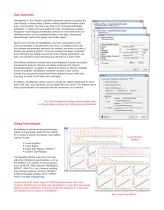
User Operation GeneMarker’s “Run Wizard” simplifies parameter setting by guiding the user through 3 simple steps, thereby making repetitive analyses quick, easy, and accurate. The User may select one of several embedded templates, or create and save additional ones. GeneMarker’s pattern recognition technology automatically corrects for most instrument and chemistry errors, such as saturated peaks, noisy data, wavelength bleed-through, instrument spikes, and stutter peaks. Nearly every function of GeneMarker has been automated so that once the template is selected from the menu, or created by...
Open the catalog to page 3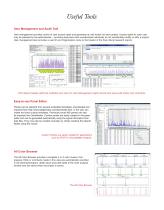
Useful Tools User Management and Audit Trail User management provides control of user access rights and generates an edit history for each project. Access rights for each user may be selected by the administrator – providing assurance that unauthorized individuals do not accidentally modify or alter a project. User management also provides a user ID and Organization name to the header of the final clinical research reports. Print Report Header (left) has Institution and User ID. User Management (right) records and saves edit history and comments. Easy-to-use Panel Editor Panels can be selected...
Open the catalog to page 4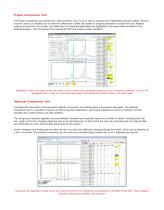
Project Comparison Tool The Project Comparison tool provides two useful functions. First, it can be used to compare two independent analysts’ projects. Second, it can be used as a validation tool to determine differences in allele calls based on analysis parameters or instrument runs. Related projects are opened in one screen; any differences in the selected parameters are highlighted in the report table and linked to the electropherogram. The tool reduces time required for SOP and analysis system validation. Highlighted Cells in the table on the right differ in one or more of the parameters...
Open the catalog to page 5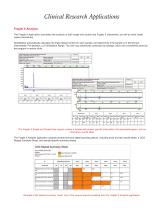
Clinical Research Applications Fragile X Analysis The Fragile X Application automates the analysis of both single and double-dye Fragile X chemistries, as well as other triplet repeat chemistries. GeneMarker automatically calculates the triplet repeat number for each sample, and determines if the sample is in the Normal, Intermediate, Pre-Mutation, or Full-Mutation Range. The user may extensively customize the settings, which are conveniently saved by the program to reduce clicks. The Fragile X Single and Double-Dye reports contain a header with project specific information, the electropherogram,...
Open the catalog to page 6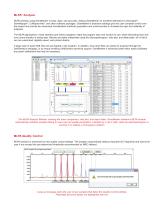
MLPA® Analysis MLPA analysis using GeneMarker is easy, rapid, and accurate, making GeneMarker an excellent alternative to Genotyper®, GeneMapper®, Coffalyser.Net®, and other software packages. GeneMarker’s extensive settings give the user complete control over the project and provide two advanced normalization methods (population and control-probe) to increase the rigor and reliability of analyses. The MLPA application’s visual interface and linked navigation make the program easy and intuitive to use, while eliminating slow and error prone transfer of sizing data. Results are easily interpreted...
Open the catalog to page 7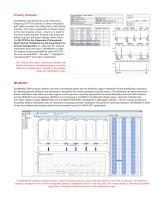
Trisomy Analysis GeneMarker aids technicians and researchers analyzing QF-PCR products to detect aneuploidy with highly accurate size calling and a user-friendly interface. The trisomy application is directly linked to the main analysis screen – there is no need for error prone data transfer. Analysts may select the default analysis and report settings; which follow the QF-PCR for the Diagnosis of Aneuploidy Best Practice Guidelines by the Association for Clinical Cytogenetics, or customize the analysis parameters and final report. GeneMarker is ideal for analysis of data generated by major QF-PCR...
Open the catalog to page 8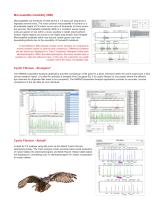
Microsatellite Instability (MSI) Microsatellites are stretches of DNA where a 1-5 base pair sequence is repeated several times. The most common microsatellite in humans is a dinucleotide repeat of CA which occurs tens of thousands of times across the genome. Microsatellite instability (MSI) is a condition where repeat units are gained or lost within a locus resulting in length polymorphism. Certain repeat regions are known to be highly polymorphic and heritable. Microsatellite instability within and around certain genes can have devastating effects due to the possibility of frameshift mutations....
Open the catalog to page 9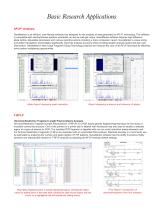
Basic Research Applications AFLP® Analysis GeneMarker is an efficient, user-friendly software tool designed for the analysis of data generated by AFLP® technology. The software is compatible with electrophoresis systems worldwide, as well as slab gel output. GeneMarker software features high efficiency allele calling, adjustable parameters and various reporting options including a trace comparison report. GeneMarker’s unique sizing and pattern recognition technologies significantly improves analysis accuracy while providing greater analysis speed and less user intervention. GeneMarker’s New Large...
Open the catalog to page 10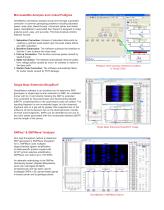
Microsatellite Analysis and Linked Pedigree GeneMarker decreases analysis set-up time through automated correction of common genotyping problems including saturated peaks, noisy data, bleed-through, instrument spikes and stutter peaks. GeneMarker’s automated Run Wizard is designed to make analysis quick, easy, and accurate. The Data Analysis window features include: 1. Saturation Correction: Analysis of saturated data points by creating a synthetic peak based upon the peak shape before and after saturation. 2. Baseline Subtraction: The software subtracts the baseline so that the Y axis is above...
Open the catalog to page 11All SoftGenetics, LLC. catalogs and technical brochures
 ChimerMarker®
8 Pages
 Mutation Surveyor®
16 Pages
 MaSTR software
12 Pages

- Analysis software
- Visualization software
- Control software
- Reporting software
- Laboratory software
- Monitoring software
- Automated software
- Acquisition software
- Design software
- Traceability software
- Training software
- Import software
- Server-based software
- Research software
- Interpretation software
- Validation software
- Molecular biology software
- Genetic software
- NGS sequencing software
- Clinical research software