
- Catalogs
- SOUTHERN IMPLANTS (Pty) Ltd.
- Product Catalogue

Product Catalogue
1 /100Pages

Product Catalogue
1 /100Pages
Catalog excerpts
SI Digital is Southern I mplants' comprehensive digital solution forCAD/CAM procedures. Precision is one of the most important aspects of any dental restoration, and this becomes more significant when it comes to digital dentistry. Southern’s digital solutions provide digital tools which accurately facilitate the digital workflow between dentist and laboratory for CAD/CAM procedures. This is achieved through the use of digital libraries and our unique abutment options, to caterfor single unit and multiple unit restorations, all in the digital workflow. Dental professionals wanting to work with...
Open the catalog to page 2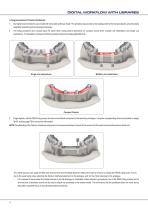
DIGITAL WORKFLOW WITH LIBRARIES 3. Finger-tighten, with the PEEK luting screw, the titanium interfacial component to the laboratory analogue. Using the corresponding driver as indicated on pages 38-39, and see page 76 for more driver information. NOTE: Sandblasting of the Titanium interfacial component is not recommended as itrounds of the comers and the exact machined dimensions will be lost. The milled structure can easily be fitted and removed from the interfacial abutment without the need to remove or replace the PEEK luting screw. This is due to the peek luting screw attaching the titanium...
Open the catalog to page 42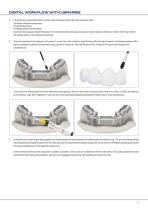
5. It is important to ultrasonically clean or steam clean the following before the luting procedure starts: - The titanium interfacial components - The short luting screws - The fitting surfaces of the prosthesis - Also clean the analogues (Implant Replicas) in the model by brushing with soap and water or steam cleaning to remove any debris which may interfere with perfect seating of the interfacial components. 6. Clean the restoration in an ultrasonic unit for about 1 minute. Dry it with oil-free air. Apply Monobond Plus (Ivoclar Vivadent) to the cleaned surfaces of the titanium interfacial...
Open the catalog to page 43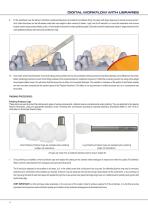
DIGITAL WORKFLOW WITH LIBRARIES 9. Fit the prosthesis over the titanium interfacial component/abutment and settle the prosthesis firmly into place with finger pressure to extrude excess cement. Arch milled structures can be left seated under their own weight to allow cement to harden. Light cure for 60 seconds, un-mount the restoration and remove excess cement using a sharp blade, probe, or hand scaler instrument to make polishing easier. (Extruded cement breaks away easily in large pieces from the outer polished surfaces of the structure and titanium ring). DIGITAL WORKFLOW WITH LIBRARIES 10....
Open the catalog to page 44
FINAL MILLING
Open the catalog to page 45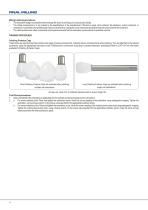
Milling & sintering procedures: • The restoration design is completed and the design file is sent to a milling unit or a production facility. • The milled component/s is to be sintered to the specifications of the manufacturer if Zirconia is used. Once sintered, the abutment, custom abutment, or restoration is cemented to the prefabricated Titanium abutment by closing the screw channel temporarily to keep the screw channel free of cement. •. The milled substructure milled is cemented onto the abutments and the final restoration constructed and cemented onto this. FINISHING PROCEDURES: Polishing...
Open the catalog to page 46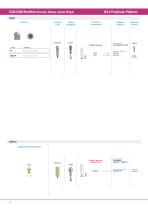
Scanning Digital Flag Analogues Prosthetic Components Software Selection Retaining Screws Main Selection SI PASSIVE EXT-HEX Indirect Compact Conical Abutment PASSIVE Abutment (Compact Conical) Main Selection SI PASSIVE COMPACT CONICAL Secondary Selection PA-MC-4S Non-Engaging PA-MC-48 NE
Open the catalog to page 50
CAD/CAM Workflow (Sirona) 03.0 Prosthetic Platform
Open the catalog to page 51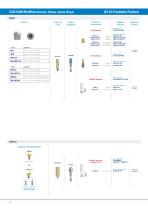
03.25 Prosthetic Platform Direct Implants Scanning Digital Flag Analogues Prosthetic Components Software RetainingSelection Screws CODE_LENGTHS_ Compact Conical Abutment ABNMCI7d 11 TSUZ9 GSUZ9 PWlM-liTU-inS-.-.. OlM OWI to. Engagrg Eogagrg EfiQa^rq Engagrg ton-Engagrg Mam Selection SI TIB EXT-HEX Secondary Selection TIB-EX-34 EN TIB-EX-34-C1.5 EN TIB-EX-34-C3 EN PASSIVE Abutment Mam Selection SI PASSIVE EXT-HEX PASSIVE Abutment {Compact Conical) Mam Selection SI PASSIVE COMPACT CONICAL Secondary Selection
Open the catalog to page 52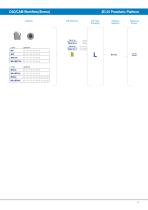
TIB Abutment 3rd Party Software Retaining Scanbody Selection Screws
Open the catalog to page 53All SOUTHERN IMPLANTS (Pty) Ltd. catalogs and technical brochures
 IT CONNECTION
28 Pages
 TIB Abutment
2 Pages
 OsteoBiol®
60 Pages
 MSc EXTERNAL HEX
40 Pages
 Southern Implants Hex Family
6 Pages
 PROSTHETIC REHABILITATION
4 Pages
 OSSEOINTEGRATED FIXTURES
16 Pages
 MAX IMPLANT
4 Pages
 QDT 2019
12 Pages
 Osteobiol
1 Page
 TRI-NEX
52 Pages
 Deep Conical Surgical
40 Pages
 Co-Axis®
1 Page
 INVERTA
36 Pages




- Implant abutment
- Titanium implant abutment
- Straight implant abutment
- Dental implant
- Titanium dental implant
- Internal implant abutment
- Conical dental implant
- Angled implant abutment
- Hexagonal implant abutment
- Bone substitute
- Screw implant abutment
- Internal dental implant
- Cylindrical dental implant
- Dental implant analog
- Internal hexagon implant abutment
- Straight dental implant analog
- Hexagonal dental implant
- Dental screwdriver
- Multi-unit implant abutment
- Internal hexagon dental implant