
- Catalogs
- SOUTHERN IMPLANTS (Pty) Ltd.
- TIB Abutment

TIB Abutment

TIB Abutment
The TiB abutment is a scannable component used in CAD/CAM dental restorations. It is compatible with leading CAD/CAM systems and can be scanned directly or through digital libraries. Made from titanium, it ensures a strong Ti-Ti connection with the implant. The design includes machined grooves for better cement retention and gold anodizing for improved aesthetics. It is available in three collar heights and in both engaging and non-engaging forms.
- Material: Titanium
- Connection: Ti-Ti
- Features: Machined grooves, gold anodizing, scannable flat side
- Variants: 3 collar heights, engaging and non-engaging
The document lists various product codes for different TiB abutment configurations, including TIB-EX, TIB-NX, TIB-EL, TIB-NL, TIB-DC, TIB-NDC, and others, each with specific collar heights and engagement types.
1. Attach the TIB abutment to the implant or lab analogue.
2. Choose the appropriate Sirona scanbody.
3. Align the guide groove in the scanbody with the TIB abutment.
4. Select the correct scanbody and TiBase in the software.
5. Perform a scan ensuring complete capture of the scan body.
6. Use Sirona software to design and mill the restoration.
7. Follow the Operating Instructions for meso blocks.
The TiB abutment is compatible with 3Shape, Exocad, and Dental Wings systems. Digital libraries are available through registration on the Southern Implants website.
Catalog excerpts
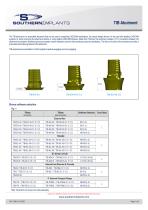
SOUTHERNXMPLANTS The TiB abutment is a scannable abutment that can be used in preparing CAD/CAM restorations. Its unique design allows it to be used with leading CAD/CAM systems by either scanning the abutment directly or using digital cAd/CAM libraries. Made from Titanium the abutment creates a Ti-Ti connection between the abutment and implant. Machined grooves increase cement retention and the Gold anodizing improves aesthetics. The flat on the side of the abutment provides a scannable and indexing feature to the abutment. TIB abutments are available in 3 collar heights as well as engaging and non-engaging. Sirona software selection Fig. 1 Note: Abutment and screw are sold seperately Images are for illustration purposes only and do not necessarily accurately represent the product. www.southernimplants.com
Open the catalog to page 1
TIB Abutment Procedure for Sirona Systems 1. Attach the TIB abutment to the implant for intra-oral scanning or lab analogue for desktop scanning and screw down with the appropriate laboratory screw and driver. 2. Chose either the white or grey Sirona scanbody depending on your Cerec scanner (refer to Cerec manuals for more details). 3. Align the guide grove in the scanbody with the TIB abutment and make sure that it seats flush without any gaps. 4. Select the correct scanbody and TiBase in the software. Refer to Table 1 for the TiBase selection. 5. Take a scan with your scanner as normal. Ensure...
Open the catalog to page 2All SOUTHERN IMPLANTS (Pty) Ltd. catalogs and technical brochures
 IT CONNECTION
28 Pages
 OsteoBiol®
60 Pages
 MSc EXTERNAL HEX
40 Pages
 Southern Implants Hex Family
6 Pages
 PROSTHETIC REHABILITATION
4 Pages
 OSSEOINTEGRATED FIXTURES
16 Pages
 MAX IMPLANT
4 Pages
 QDT 2019
12 Pages
 Product Catalogue
100 Pages
 Osteobiol
1 Page
 TRI-NEX
52 Pages
 Deep Conical Surgical
40 Pages
 Co-Axis®
1 Page
 INVERTA
36 Pages




- Implant abutment
- Titanium implant abutment
- Straight implant abutment
- Dental implant
- Titanium dental implant
- Internal implant abutment
- Conical dental implant
- Angled implant abutment
- Hexagonal implant abutment
- Bone substitute
- Screw implant abutment
- Internal dental implant
- Cylindrical dental implant
- Dental implant analog
- Internal hexagon implant abutment
- Straight dental implant analog
- Hexagonal dental implant
- Dental screwdriver
- Multi-unit implant abutment
- Internal hexagon dental implant