
- Catalogs
- Spiegelberg
- ICP Monitor HDM29.2

- Company
- Products
- Catalogs
- News & Trends
- Exhibitions
ICP Monitor HDM29.2

ICP Monitor HDM29.2
Catalog excerpts
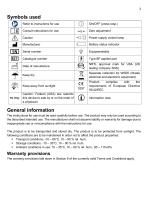
The instructions for use must be read carefully before use. The product may only be used according to the described intended use. The manufacturer shall not assume liability or warranty for damage due to inappropriate use or noncompliance with the instructions for use. The product is to be transported and stored dry. The product is to be protected from sunlight. The following conditions are to be maintained in order not to affect the product properties: Warranty provisions The warranty provisions laid down in Section 8 of the currently valid Terms and Conditions apply.
Open the catalog to page 3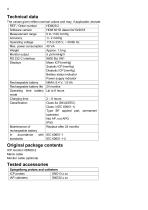
Technical data The values given reflect nominal values and may, if applicable, deviate.
Open the catalog to page 4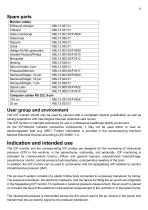
The ICP monitor should only be used by persons with a completed medical qualification as well as having experience with neurological traumas (intensive care nurse). The ICP monitor is intended exclusively for use in professional healthcare facility enviroment. As the ICP-Monitor contains conductive components, it may not be used within or near an electromagnetic field (e.g. MRT). Further information is provided in the accompanying brochure Medical Electrical Devices according to IEC 60601-1-2. The ICP monitor and the corresponding ICP probes are designed for the monitoring of intracranial pressure...
Open the catalog to page 5
6 The digital display then shows the mean as well as the systolic and diastolic intracranial pressure (ICP). The ICP monitor output provides both the mean pressure as well as the pulsatile signal. After 10 minutes and once hourly thereafter, the ICP monitor opens the pressure transducer to atmospheric pressure for zero adjustment. The ICP monitor may not be used for purposes other than those indicated. The contraindications to ICP monitoring result from the contraindications of the ICP probes to be used, which include the following points, among others: infections of the scalp, in patients receiving...
Open the catalog to page 6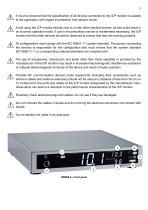
7 It must be ensured that the classification of all devices connected to the ICP monitor is suitable to the application with regard to protection from electric shock. Avoid using the ICP monitor directly next to or with other stacked devices, as this could result in an incorrect operation mode. If use in the prescribed manner is nonetheless necessary, the ICP monitor and the other devices should be observed to ensure that they are working properly. All configurations must comply with the IEC 60601-1-1 system standard. The person connecting the devices is responsible for the configuration and...
Open the catalog to page 7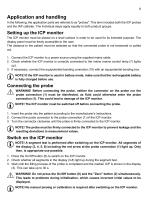
In the following, the application parts are referred to as "probes". This term includes both the ICP probes and the IAP catheter. The individual steps apply equally to both product groups. The ICP monitor must be placed on a level surface in order to be used for its intended purpose. The display panel must be freely accessible to the user. The distance to the patient must be selected so that the connected probe is not tensioned or pulled out. 1. Connect the ICP monitor to a power source using the supplied mains cable. 2. Check whether the ICP monitor is correctly connected to the mains (mains...
Open the catalog to page 9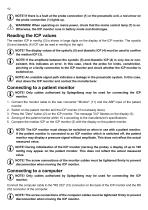
10 NOTE! If there is a fault at the probe connection (1) or the pneumatic unit, a red arrow on the probe connection (1) lights up. WARNING! When operating on mains power, check that the mains control lamp (7) is on. Otherwise, the ICP monitor runs in battery mode and discharges. The median ICP in mmHg (3) is shown in large digits on the display of the ICP monitor. The systolic (5) and diastolic (4) ICP can be read in mmHg to the right. NOTE! The display values of the systolic (5) and diastolic ICP (4) must be used to confirm the median ICP (3). NOTE! If the amplitude between the systolic (5)...
Open the catalog to page 10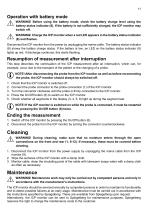
/i\ WARNING! Before using the battery mode, check the battery charge level using the ' ' ^ battery status indicator (8). If the battery is not sufficiently charged, the ICP monitor may switch off. WARNING! Charge the ICP monitor when a red LED appears in the battery status indicator ‘ ' ' (8) and flashes. Disconnect the ICP monitor from the power by unplugging the mains cable. The battery status indicator (8) shows the battery charge status. If the battery is low, an LED on the battery status indicator (8) lights up red. If discharge continues, this starts flashing. This step describes the continuation...
Open the catalog to page 11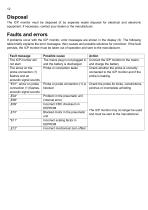
The ICP monitor must be disposed of by separate waste disposal for electrical and electronic equipment. If necessary, contact your dealer or the manufacturer. If problems occur with the ICP monitor, error messages are shown in the display (3). The following table briefly explains the error messages, their causes and possible solutions for correction. If the fault persists, the ICP monitor must be taken out of operation and sent to the manufacturer.
Open the catalog to page 12
Spiegelberg GmbH & Co. KG Tempowerkring 4 21079 Hamburg Germany Subject to technical modifications without notice.
Open the catalog to page 13All Spiegelberg catalogs and technical brochures
 SND13.1.53/FV534P
12 Pages
 Product Brochure Complete Range
24 Pages
Archived catalogs
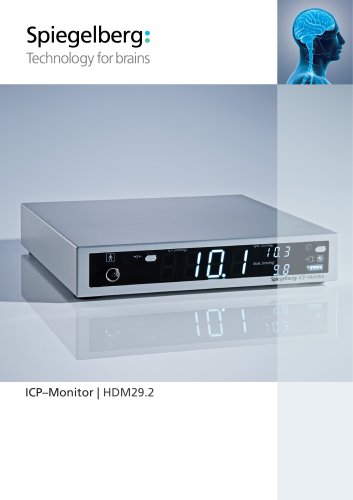 ICP–Monitor | HDM29.2
2 Pages
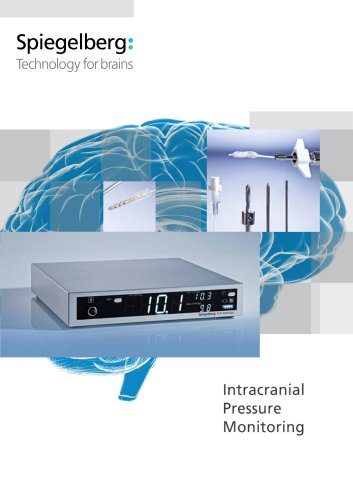 Intracranial Pressure Monitoring
12 Pages

- Patient monitor
- Gas filter
- Spiegelberg drainage catheter
- Portable patient monitor
- Intensive care patient monitor
- Compact patient monitor
- Drainage set
- Clinical patient monitor
- Medical filter
- 8 FR catheter
- Continuous patient monitor
- Graduated drainage set
- 10 FR catheter
- Tabletop patient monitor
- Sterile filter
- Spiegelberg neurological catheter
- PU catheter
- Pressure patient monitor
- Surgery unit patient monitor
- VirtualExpo Group
- Our Partners
- Recruitment
- Testimonials