
- Catalogs
- SynDaver Labs
- Cardiovascular Pump System


Cardiovascular Pump System
Cardiovascular Pump System
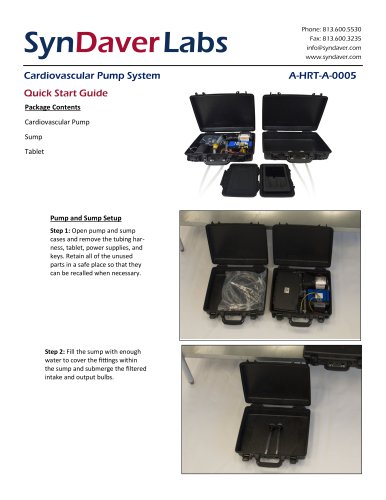
- Step 1: Open the pump and sump cases. Remove the tubing harness, tablet, power supplies, and keys. Keep unused parts in a safe place for future use.
- Step 2: Fill the sump with water to cover the fittings and submerge the intake and output bulbs.
- Step 3: Close and latch the sump and pump cases securely. Connect the tubing fittings to their respective destinations (arterial to arterial, venous to venous).
- Step 4: Turn on the pump using the knife switch on the lower right side of the case. Power on the tablet by pressing and holding the power button. Load the SynDaver Labs application.
- Step 5: Select the Bluetooth connectivity icon in the application and choose the available device address. Turn on the control board within the pump using the power button icon.
- Step 6: Run a prime cycle to prepare the vascular system for operation.
- Step 7: Once primed, activate the simulated blood flow by adjusting the pulse rate slider.
- Step 1: Place the pump and tablet in a safe, dry location with access to a 110V wall outlet. Connect the power supplies to the devices and plug them into the wall.
- Step 2: Allow the devices to charge fully. Note: Do not run the pump while it is plugged in.
Catalog excerpts
SynDaver Labs Cardiovascular Pump System Quick Start Guide Package Contents Cardiovascular Pump Sump Pump and Sump Setup Step 1: Open pump and sump cases and remove the tubing harness, tablet, power supplies, and keys. Retain all of the unused parts in a safe place so that they can be recalled when necessary. Step 2: Fill the sump with enough water to cover the fittings within the sump and submerge the filtered intake and output bulbs. Phone: 813.600.5530 Fax: 813.600.3235 [email protected] www.syndaver.com
Open the catalog to page 1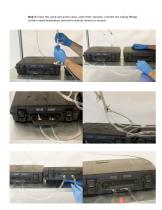
Step 3: Close the sump and pump cases, latch them securely. Connect the tubing fittings to their mated destinations (arterial to arterial, venous to venous)
Open the catalog to page 2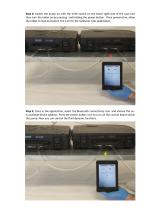
Step 4: Switch the pump on with the knife switch on the lower right side of the case and then turn the tablet on by pressing and holding the power button. Once powered on, allow the tablet to load and select the icon for the SynDaver Labs application. Step 5: Once in the application, select the Bluetooth connectivity icon and choose the only available device address. Press the power button icon to turn on the control board within the pump. Now you can control the fluid dynamic functions.
Open the catalog to page 3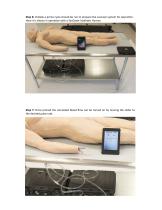
Step 6: Initially a prime cycle should be run to prepare the vascular system for operation. Here it is shown in operation with a SynDaver Synthetic Human. Step 7: Once primed the simulated blood flow can be turned on by moving the slider to the decided pulse rate.
Open the catalog to page 4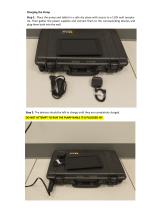
Step 1: Place the pump and tablet in a safe dry place with access to a 110V wall receptacle. Then gather the power supplies and connect them to the corresponding devices and plug them both into the wall. Step 2: The devices should be left to charge until they are completely charged. DO NOT ATTEMPT TO RUN THE PUMP WHILE IT IS PLUGGED IN!
Open the catalog to page 5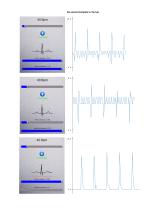
Six second samples in mL/sec
Open the catalog to page 6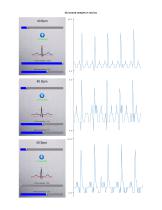
Six second samples in mL/sec
Open the catalog to page 7All SynDaver Labs catalogs and technical brochures
 Synthetic Human Anatomy Diagram
15 Pages
 Anatomy Model G2
2 Pages
 Anatomy Arm
1 Page

- Anatomy model
- Training anatomy model
- Teaching anatomical model
- Training phantom
- Rectangular table
- General care phantom
- Surgical anatomy model
- Stainless steel table
- Upper body simulator
- Bone anatomy model
- Intracranial anatomical model
- Surgical phantom
- Plastic anatomical model
- Table on castors
- Hand sanitizer
- Respirator mask
- Pad simulator
- Injection simulator
- Leg anatomical model
- Portable simulation unit