
- Catalogs
- Thermo Scientific
- Forma Series II Water Jacket CO2 Incubator


Forma Series II Water Jacket CO2 Incubator

Forma Series II Water Jacket CO2 Incubator
This document serves as the operating and maintenance manual for the Thermo Scientific Forma Series II Water Jacket CO2 Incubator, Model 3100 Series. It provides comprehensive instructions for installation, operation, and maintenance, designed for controlled temperature and CO2 environments in microbiological and cell culture applications.
The incubator models differ by CO2 sensor type (thermal conductivity or infrared), voltage, and maximum temperature. They are intended for indoor use only and require regular shutdowns for disinfection and maintenance.
These incubators are designed for laboratory and medical professionals for research and regulated cell therapy applications, not for general public use or outdoor environments.
Instructions cover installing the unit, stacking incubators, connecting to electrical power, and setting up gas supplies. Proper leveling and filling of the water jacket and humidity pan are also detailed.
Calibration procedures for temperature, CO2, O2, and relative humidity are provided, including stabilization periods and sensor-specific instructions.
Guidance is given on setting alarms, enabling displays, and configuring gas guard systems. Instructions for setting access codes and alarm limits are included.
Routine maintenance includes cleaning the interior and exterior, replacing filters, and maintaining the water jacket. Procedures for reversing the door swing and replacing sensors are also provided.
Information on connecting remote alarm contacts, RS485 interfaces, and analog output boards is included for models with these options.
Important safety warnings are highlighted, including electrical hazards, asphyxiation risks, and lifting precautions. Users are advised to follow proper safety and hygiene practices.
Contact details for Thermo Fisher Scientific are provided for technical support, warranty service, and additional information.
This document provides detailed instructions and specifications for the installation, operation, and maintenance of the Thermo Scientific Water Jacketed CO2 Incubator. It includes sections on gas supply connections, control panel operations, and stacking procedures.
The control panel features various indicators and keys for operating the incubator, including modes for setting system parameters, calibrating, and configuring options. The panel displays system status and alerts through a message center.
Instructions are provided for connecting CO2 and N2 gas supplies, including the use of a Gas Guard to monitor gas levels.
Specifications for the incubator are listed, along with a guide to spare parts available for different models and configurations.
Guidelines for cleaning and maintenance emphasize the use of appropriate disinfectants and handling of sensitive components like HEPA filters.
HEPA Filter Installation: Install the filter as per instructions and set the replacement reminder.
Side Duct and Shelf Installation: Ensure proper orientation and leveling.
Electrical Connection: Connect to a grounded dedicated circuit.
Water Jacket and Humidity Pan Filling: Use sterile distilled water and avoid chlorinated water.
Gas Supply Connection: Ensure gas purity and proper pressure regulation.
System Setpoints: Adjust temperature, CO2, and O2 levels as needed.
Calibration is crucial for maintaining accuracy. The document outlines the calibration process for air temperature, CO2, O2, and relative humidity, recommending annual calibration.
1. Audible Alarm Configuration: Toggle the alarm on or off.
2. HEPA Filter Maintenance: Reset the replacement reminder.
3. Access Code Setup: Set a three-digit access code.
4. Temperature and CO2 Alarm Limits: Set alarms for deviations from setpoints.
5. RH and O2 Alarm Configuration: Set alarms for deviations from setpoints.
6. Display Configuration: Configure the display to show desired parameters.
7. Gas Guard and RS485 Configuration: Configure the Gas Guard system and RS485 address.
The incubator is equipped with an alarm system that displays messages when an alarm is active. Alarms include sensor faults, door open alerts, and gas level warnings.
Regular preventive maintenance is crucial for optimal performance. The document provides a schedule for checking tank levels, inspecting door latches, and verifying calibration.
Routine maintenance includes cleaning the incubator's interior with appropriate disinfectants and ensuring all surfaces are thoroughly cleaned and dried.
1. Removal and Cleaning: Remove and clean all removable parts.
2. Blower Scroll and Wheel Maintenance: Clean or replace as necessary.
3. Interior Cleaning: Wash the cabinet interior and door.
4. Reassembly: Reinstall all components and power on the incubator.
5. Door Reversal Procedure: Reposition door hinges and strike plate.
6. Fuse Replacement: Replace fuses as needed.
7. Filter Replacement: Replace filters as per schedule.
8. Draining Water Jacket: Follow proper drainage sequence.
Remove the drain plug, connect the hose barb insert, and clean up any spilled water. Add rust inhibitor to the water jacket as needed.
Remote Alarm Contacts: Monitor alarms through relay contacts.
RS485 Communications Option: Connect to a Model 1535 alarm system.
Analog Output Boards: Options available for different signal types.
Gas Guard for CO2 or N2: Monitors pressures and switches gas supply when needed.
The humidity readout can be displayed continuously or toggled with the temperature readout. Factors affecting humidity levels include water level, door opening frequency, and air leakage.
The cooling coil extends the incubator's temperature range and affects chamber uniformity. Condensation may occur under certain conditions.
The incubator operates with a temperature control of ±0.1°C and a range from +5°C above ambient to +55°C. CO2 and O2 control is better than ±0.1%, with specific ranges for each.
A comprehensive list of spare parts is provided, including sensors, filters, and electrical components.
Catalog excerpts

User Manual Model 3100 Series Forma Series II Water Jacket CO2 Incubator Operating and Maintenance Manual 7053110 Rev. 2 Visit us online to register your warranty www.thermoscientific.com/labwarranty
Open the catalog to page 1
Table 1. Single Chamber Models Model *T/C is a thermal conductivity sensor. IR is an infrared sensor. **All units are 50/60 Hz. Changed label on remote alarm artwork to note - pg 6-1 Added risk assessment information Thermo Scientific Water Jacketed CO2 Incubator
Open the catalog to page 2
CAUTION Contains Parts and Assemblies Susceptible to Damage by Electrostatic Discharge (ESD) Important Read this operating manual. Failure to read, understand and follow the instructions in this manual may result in damage to the unit, injury to operating personnel, and poor equipment performance. s Warning All internal adjustments and maintenance must be performed by qualified service personnel. s Material in this manual is for information purposes only. The contents and the product it describes are subject to change without notice. Thermo Fisher Scientific makes no representations or warranties...
Open the catalog to page 3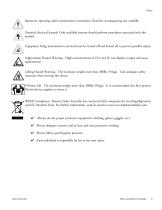
Important operating and/or maintenance instructions. Read the accompanying text carefully. Potential electrical hazards. Only qualified persons should perform procedures associated with this symbol. Equipment being maintained or serviced must be turned off and locked off to prevent possible injury. Asphyxiation Hazard Warning. High concentrations of CO2 and N2 can displace oxygen and cause asphyxiation! Lifting Hazard Warning. The incubator weighs more than 200lbs (91kgs). Take adequate safety measures when moving this device. 4-Person Lift. The incubator weighs more than 200lbs (91kgs). It is...
Open the catalog to page 4
Do You Need Information or Assistance on Thermo Scientific Products? If you do, please contact us 8:00 a.m. to 6:00 p.m. (Eastern Time) at: 1-740-373-4763 1-800-438-4851 1-877-213-8051 http://www.thermoscientific.com [email protected] www.unitylabservices.com Direct Toll Free, U.S. and Canada FAX Internet Worldwide Web Home Page Tech Support Email Address Certified Service Web Page Our Sales Support staff can provide information on pricing and give you quotations. We can take your order and provide delivery information on major equipment items or make arrangements to have...
Open the catalog to page 5
Warranty Notes Information You Should Know Before Requesting Warranty Service • Locate the model and serial numbers. A serial tag is located on the unit itself. • For equipment service or maintenance, or with technical or special application inquiries, contact Technical Services at 1-800-438-4851 or 1-740-373-4763 (USA and Canada). Outside the USA, contact your local distributor. Repairs NOT Covered Under Warranty • Calibration of control parameters. Nominal calibrations are performed at the factory; typically ±1°C for temperature, ±1% for gases, and ±5% for humidity. Our service personnel can...
Open the catalog to page 6
Table of Contents Section 1 Thermo Scientific Installation and Start-Up . . . . . . . . . . . . . . . . . . . . . . . . . . . . . . . . . . . . . .1-1 Name and Description of Parts . . . . . . . . . . . . . . . . . . . . . . . . . . . . .1-1 Control Panel Keys, Displays & Indicators . . . . . . . . . . . . . . . . . . . .1-2 Control Panel Operation . . . . . . . . . . . . . . . . . . . . . . . . . . . . . . . . . .1-3 Installing the Unit . . . . . . . . . . . . . . . . . . . . . . . . . . . . . . . . . . . . . . .1-4 Stacking the Incubators . . . . . . . . . . . . . . . . . . . . . . . . . ....
Open the catalog to page 8
Alarms . . . . . . . . . . . . . . . . . . . . . . . . . . . . . . . . . . . . . . . . . . . . . . . . . . . . . .4-1 Inner Door Open Alarm . . . . . . . . . . . . . . . . . . . . . . . . . . . . . . . . . .4-2 Sensor Fault Alarms . . . . . . . . . . . . . . . . . . . . . . . . . . . . . . . . . . . . . .4-2 Configuration . . . . . . . . . . . . . . . . . . . . . . . . . . . . . . . . . . . . . . . . . . . . . . . .3-1 Turning the Audible Alarm ON/OFF . . . . . . . . . . . . . . . . . . . . . . . .3-1 New HEPA Filter . . . . . . . . . . . . . . . . . . . . . . . . . . . . . . . . . . . . . ....
Open the catalog to page 9
Spare Parts . . . . . . . . . . . . . . . . . . . . . . . . . . . . . . . . . . . . . . . . . . . . . . . . . .8-1 All Models . . . . . . . . . . . . . . . . . . . . . . . . . . . . . . . . . . . . . . . . . . .8-1 Spare Parts - 115V . . . . . . . . . . . . . . . . . . . . . . . . . . . . . . . . . . . . .8-2 Spare Parts - 230V . . . . . . . . . . . . . . . . . . . . . . . . . . . . . . . . . . . . .8-2 Spare Parts - IR or O2 . . . . . . . . . . . . . . . . . . . . . . . . . . . . . . . . . . .8-3 Spare Parts - Gas Guard . . . . . . . . . . . . . . . . . . . . . . . . . . . . . . . . .8-3 Spare...
Open the catalog to page 10
Component Name and Description Figure 1-1. Water Jacket Incubator • Outer Door - Reversible to opposite swing (Section 5). Heated Inner Door - Keeps chamber interior dry. Reversible to opposite swing (Section 5). Chamber Gas Sample Port - Used for sampling chamber CO2 and optional O2 content, for calibration (Section 2). Main Power Switch Control Panel - Keypad, Displays and Indicators (Figure 1-2). Fill Port - Used for filling the water jacket. Water Jacket Vent - Allows air to escape from the water jacket during filling and normal expansion and contraction when the incubator heats or cools....
Open the catalog to page 12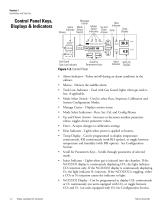
Section 1 Installation and Start-Up Control Panel Keys, Displays & Indicators Message Heat Center Indicator Model Up and Alarm Mode Temp Select Down Indicator Select Display Indicators Arrows Enter Switch Silence Gas Guard Tank Low Indicator Scroll for Parameters Keys Inject %CO2/O2 Indicator Display Figure 1-2. Control Panel • • Tank Low Indicator - Used with Gas Guard, lights when gas tank is low, if applicable. Mode Select Switch - Used to select Run, Setpoints, Calibration and System Configuration Modes. Message Center - Displays system status. Mode Select Indicators - Run, Set, Cal, and...
Open the catalog to page 13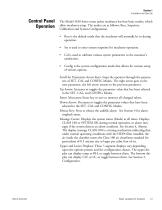
Section 1 Installation and Start-Up Control Panel Operation The Model 3100 Series water jacket incubator has four basic modes, which allow incubator setup. The modes are as follows: Run, Setpoints, Calibration and System Configuration. • Run is the default mode that the incubator will normally be in during operation. Set is used to enter system setpoints for incubator operation. Cal is used to calibrate various system parameters to the customer’s satisfaction. Config is the system configuration mode that allows for custom setup of various options. Scroll for Parameters Arrow Keys: Steps the operator...
Open the catalog to page 14All Thermo Scientific catalogs and technical brochures
 Nunc Cell Factory systems
12 Pages
 CryoStar NX50
2 Pages
 MSC-Advantage BSC
54 Pages
 Multifuge
58 Pages
 Thermo Scientific Pico 17 / 21
52 Pages
 CO2 Incubator HERAcell 150 i / 240 i
196 Pages
 Revco® Blood Bank Refrigerators
37 Pages
 Multidrop Combi nL
4 Pages
 Forma Environmental Chambers
25 Pages
 MaxQ 6000
40 Pages
 Multi Tube Rotator
13 Pages
 picoSpin Spectrometer
6 Pages
 1300 Series A2
76 Pages
 CO2 Incubator Family
28 Pages
 CO2 incubators
7 Pages
 MaxQ Mini 4450 Shaker
40 Pages
 E1-ClipTip Electronic Pipette
108 Pages
 Varioskan™ LUX
54 Pages
 ISQ Series Mass Spectrometers
412 Pages
 Q Exactive™ BioPharma
16 Pages
 Q Exactive Plus
4 Pages
 LTQ XL™
4 Pages
 Platinum DNA polymerases
6 Pages
 -80°C Benchtop Freezer
2 Pages
 Nicolet iS10 FT-IR Spectrometer
12 Pages
 Ion S5 and Ion S5 XL Systems
2 Pages
 SureTect Range
4 Pages
 QuantStudio™ 3
8 Pages
 Furnaces
2 Pages
 Nunc Serological Pipettes
3 Pages
![Vanquish Duo UHPLC System [ZH]](https://img.medicalexpo.com/pdf/repository_me/78678/vanquish-duo-uhplc-system-zh-191145_1mg.jpg) Vanquish Duo UHPLC System [ZH]
Vanquish Duo UHPLC System [ZH]12 Pages
 native MS
16 Pages
 Compound Discoverer Software
12 Pages
 Vanquish Horizon UHPLC System
16 Pages
 Thermo Scientific TSQ Duo
9 Pages
 Thermo Scientific TSQ 8000 Evo
16 Pages
 Heraeus Labofuge 300
2 Pages
 Heraeus Cryofuge 5500i
8 Pages
 Heraeus Clinifuge Centrifuge
2 Pages
 Vials and Closures Catalog 2014-2015
128 Pages
 RM 200 EG
4 Pages
 Darwin LIMS
2 Pages
 Immunohistory Solutions
292 Pages
 Process Water Products Catalog
68 Pages
 Technical Training Catalog
15 Pages
 FBS Alternatives
8 Pages
 Pierce Magnetic Beads
16 Pages
 interactive catalog today
222 Pages
 HERAGUARD HPH clean benches
2 Pages
 MBC 240 Bench Top Analyzer
4 Pages
 Konelab 20
2 Pages
 Indiko
6 Pages





![ISQ 7000 Single Quadrupole GC-MS System VPI [ZH]](https://img.medicalexpo.com/pdf/repository_me/78678/isq-7000-single-quadrupole-gc-ms-system-vpi-zh-191148_1mg.jpg)
![ISQ 7000 Single Quadrupole GC-MS System [ZH]](https://img.medicalexpo.com/pdf/repository_me/78678/isq-7000-single-quadrupole-gc-ms-system-zh-191147_1mg.jpg)


![Thermo Scientific Herasafe KS and KSP Class II Biological Safety Cabinets [EN]](https://img.medicalexpo.com/pdf/repository_me/78678/thermo-scientific-herasafe-ks-ksp-class-ii-biological-safety-cabinets-en-85081_1mg.jpg)


Archived catalogs
 Nunc Cell Factory systems
8 Pages
- Vertical refrigerator
- Laboratory refrigerator
- 1-door refrigerator
- Automatic defrost refrigerator
- Electric refrigerator
- Laboratory incubator
- Refrigerator with glass door
- Laboratory centrifuge
- Benchtop centrifuge
- Laboratory agitator
- Sample tube
- Stainless steel refrigerator
- Blood centrifuge
- Sample preparation system
- Laboratory test tube
- Automatic sample processor
- Clinical chemistry analyzer
- Temperature-control laboratory incubator
- Heating oven
- Laboratory oven