
- Catalogs
- Thermo Scientific
- MSC-Advantage BSC


MSC-Advantage BSC

MSC-Advantage BSC
The document provides comprehensive operating instructions for the MSC-Advantage Biological Safety Cabinet by Thermo Fisher Scientific. It emphasizes correct usage, adherence to safety standards, and warranty conditions. The cabinet is intended for use by trained personnel, with repairs to be conducted by authorized experts. The German version of the instructions is the authoritative text.
Details are provided on the standard components included with the cabinet, the acceptance inspection process, and transport security. Installation instructions cover ambient conditions, room ventilation, and correct placement, including series installation and transport.
The cabinet includes a safety system, filter system, and various operating and display elements. It features a sample chamber, device interfaces, and illumination options such as a UV lamp unit.
Initial operation involves installing the device and accessories, unlocking transport protection, leveling the cabinet, and connecting the power supply. An installation test is required before use.
The operating panel includes functional units and displays for calibration and UV disinfection. The document describes operating modes and responses to failure messages.
Guidelines for hygiene preparations, loading the sample chamber, and work rules are provided. The document also addresses failure message responses.
Instructions for interrupting operations, shutting down the device, and maintenance procedures are included. This section covers inspection, service, retrofitting, and repairs.
Decontamination procedures include wipe/spray disinfection, UV disinfection, and formaldehyde use. Cleaning instructions for exterior surfaces, the front window, floorpan, and protective grid are detailed.
The document provides a disposal procedure and technical data for the device. A device log and certificate of decontamination are also included.
Figures illustrate device arrangement, lift points, and various components. Symbols used in the instructions and on the device are explained, including warnings and recycling information.
Correct Use: The cabinet is designed for microbiological and biotechnical laboratories with safety levels 1, 2, and 3, compliant with EN 12469. Operators must document decontamination procedures and perform installation tests before use.
Incorrect Use: The cabinet should not be used in non-compliant laboratories or without repeat tests after modifications. The alarm system must remain functional, and gaseous substances should not be processed in the device.
Scope of Delivery: Includes the biological safety cabinet, armrests, and documentation. Optional components are listed separately.
Acceptance Inspection: Check for completeness and damage upon delivery. Report issues immediately.
Transport Security: The device is protected during transport by a security lock and packaging.
Ambient Conditions: The device should be operated at locations meeting specific conditions, including altitude, power supply, and room dimensions. Temperature and humidity must be controlled.
Room Ventilation: Proper ventilation is required to prevent drafts and ensure safe air discharge.
Correct Location: Install in draft-free areas away from plant traffic. Ensure accessibility for cleaning and disinfection.
Transport: Use appropriate carriers and secure the device against tilting during transport.
Overall View: Includes components like the plenum assembly, switchbox, light dome, operating panel, and more.
Safety System: Features vacuum-sealed air systems, HEPA filters, and alarm systems for personal and material protection.
Filter System: Utilizes HEPA filters for downflow and exhaust air, ensuring ultrapure air in the sample chamber.
Operating and Display Elements: The cabinet is operated via a panel with keys, indicators, and a display.
- Normal Operation: Displays operating hours of the device.
- Safe Work Mode: Shows downflow and exhaust air velocities.
- Calibration Routine: Indicates the status of the calibration function.
- Device-Controlled UV Disinfection (Optional): Displays remaining disinfection time.
- The front window made of multi-layer security glass seals the safety sample chamber front side up.
- Accessible through various positions for operation and cleaning.
- Positions include work position, maximal opening height for loading, and closed state with reduced blower speed.
- SmartClean window cleaning position allows for cleaning and disinfecting the upper section of the front window.
- Includes outlets for power supply, bushings for cables, media valves, and hoses, a communication port, and a connection to external alarm systems.
- Power supply connection is established via a cable with a grounding plug.
- Communication port includes an RS232 connection for a PC.
- SmartPort is provided for leading through cables or hoses.
- Fluorescent tubes are installed for illumination.
- Optional UV lamp installed to the ceiling at the front section of the sample chamber.
- UV disinfection routine can be started by a key on the operating panel.
- Comprises a segmented workplate placed above the sample chamber floorpan.
- Armrests are positioned centrically to the working area.
- Initial operation requires an installation test.
- Device control starts an automatic calibration routine upon initial connection to the power supply.
- Installation of the device and accessories involves placing the device on a stable substructure or stand.
- Transport protection must be unlocked before moving the front window.
- Power supply connection requires checking for voltage compatibility and ensuring proper grounding.
- Must be performed according to EN 12469 / 2000 specifications.
- Includes tests for electrical safety, inflow velocity, downflow velocity, HEPA filter leakage, and airflow control.
- The operating panel is divided into display, keys, and status indicators.
- Displays operating hours, downflow and exhaust air velocities, calibration status, and UV disinfection status.
The device features several keys for operation: a power key for switching the device on/off, an operating data key for displaying operating hours and air velocities, and enabling/disabling the alarm acknowledge function. Additional keys control the sample chamber illumination, power supply to outlets, UV disinfection, and alarm acknowledgment.
LED indicators show the status of the air system, airflow steadiness, and front window position. The SmartFlow display indicates the exhaust control's compensation capability.
The device operates in several modes: Calibration, OFF, Window Open, Work, Standby, and UV mode. Each mode has specific functions and status indicators, such as airflow and window position.
To start the device, switch it on and ensure the front window is in the work position. The device is ready when the airflow is steady. During operation, maintain hygiene by disinfecting surfaces and using clean accessories.
Failure messages are displayed with codes ER 3 to ER 7. If these appear, contact Technical Service. Basic troubleshooting includes checking airflow and ensuring no blockages.
Follow safety protocols such as wearing protective gear, maintaining cleanliness, and avoiding air turbulence. Proper sitting posture is recommended for extended work periods.
For temporary interruptions, remove samples and clean the chamber. For long-term shutdown, decontaminate the device and disconnect it from power.
Decontamination methods include wipe/spray disinfection, UV disinfection, steam sterilization, and formaldehyde disinfection. The choice depends on the risk level and required purity. Use compatible disinfectants to avoid damaging surfaces.
Catalog excerpts

Operating Instructions Biological Safety Cabinet MSC-Advantage™
Open the catalog to page 1
Operating Instructions Biological Safety Cabinet | MSC-Advantage Inhaltsverzeichnis Copyright 2011 These operating instructions are protected by copyright. Rights resulting thereof, particularly reprint, photomechanical or digital postprocessing or reproduction, even in part, are only allowed with the written consent of Thermo Electron LED GmbH. This regulation does not apply to reproductions for in-plant use. Trademarks MSC Advantage and SmartFlow are registered trademarks of Thermo Scientific. Thermo Scientific is a brand of Thermo Fisher Scientific Inc. All other trademarks mentioned in the...
Open the catalog to page 2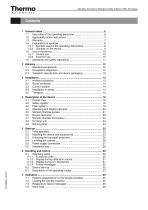
Operating Instructions Biological Safety Cabinet | MSC-Advantage
Open the catalog to page 3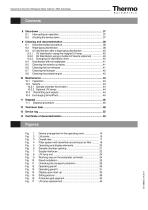
Operating Instructions Biological Safety Cabinet | MSC-Advantage
Open the catalog to page 4
Operating Instructions Biological Safety Cabinet | MSC-Advantage General notes The following are the addresses of the international Thermo FisherScientific Sales Organisations. Postal address Germany Thermo Electron LED GmbH Robert-Bosch-Straße 1 D - 63505 Langenselbold Inquiries from Germany Phone Phone Sales 0800 1 536376 Phone Service 0800 1 112110 Fax Sales/Service 0800 1 112114 EMail [email protected] Enquiries from Europe, Middle East and Africa Phone + 49 (0) 6184 / 90-6940 Fax + 49 (0) 6184 / 90-6772 EMail [email protected] Postal address USA Thermo...
Open the catalog to page 5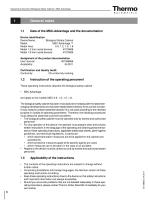
Operating Instructions Biological Safety Cabinet | MSC-Advantage Data of the MSC-Advantage and the documentation Device identification Device Name: Biological Safety Cabinet Model: MSC-Advantage ™ Model lines: 0.9, 1.2, 1.5, 1.8 Model 1.2.from serial devices: 41070608 Model 1.8.from serial devices: 41070639 Assignment of the product documentation User manual: 501268856 Availability: 04.2011 Certification and Quality Audit: Conformity: CE conformity marking Instruction of the operating personnel These operating instructions describe the biological safety cabinet • and apply to the models MSC 0.9,...
Open the catalog to page 6
Operating Instructions Biological Safety Cabinet | MSC-Advantage Thermo Fisher Scientific warrants the operational safety and functions of the biological safety cabinet only under the condition that: • the device is operated and serviced exclusively in accordance with its intended purpose and as described in these operating instructions, • the device is not modified, • only original spare parts and accessories that have been approved by Thermo Fisher Scientific are used, • inspections and maintenance are performed at the specified intervals, • an installation test is performed prior to the initial...
Open the catalog to page 7
Operating Instructions Biological Safety Cabinet | MSC-Advantage General notes Symbols used in the operating instructions WARNING! is used if non-observance may cause serious or even lethal injuries. CAUTION! is used if non-observance may cause medium to minor injuries or damage. NOTE! is used for hints and useful information. RECYCLING! Valuable raw materials can be reused. Warning against electric shock.
Open the catalog to page 8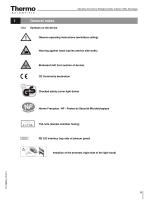
Operating Instructions Biological Safety Cabinet | MSC-Advantage Observe operating instructions (switchbox ceiling) Warning against hand injuries (device side walls) Biohazard (left front section of device) Checked safety (cover light dome) Norme Française / NF - Postes de Sécurité Microbiologique T5A note (sample chamber fusing) RS 232 interface (top side of plenum panel) Installion of the armrests (right side of the light hood)
Open the catalog to page 9
Operating Instructions Biological Safety Cabinet | MSC-Advantage General notes 1.7.1 Correct use The Biological Safety Cabinet is a laboratory device for installation and operation in microbiological and biotechnical laboratories of safety levels 1, 2, and 3. It has been designed as a Class II microbiological biological safety cabinet, in accordance with EN 12469. Depending on the hazard level of the agents involved, the operator must prepare in writing appropriate decontamination procedures for the device and the accessories used in the sample chamber. Prior to the initial operation of the cabinet,...
Open the catalog to page 10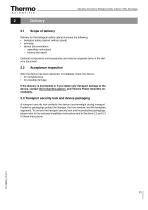
Operating Instructions Biological Safety Cabinet | MSC-Advantage Delivery for the biological safety cabinet includes the following: • biological safety cabinet (without stand) • armrests • device documentation: – operating instructions – factory test report Optional components and accessories are listed as separate items in the delivery document. Acceptance inspection After the device has been delivered, immediately check the device: • for completeness, • for possible damage. If the delivery is incomplete or if you detect any transport damage to the device, contact the forwarding agency and Thermo...
Open the catalog to page 11
Operating Instructions Biological Safety Cabinet | MSC-Advantage Ambient conditions The operational safety and correct function of the device depends on the location where it is to be operated. The biological safety cabinet must be operated only at locations that meet the ambient conditions listed below. Location requirements: • The electrical system of the device has been designed for an operating height of up to 2000 m above sea level. • The mains power supply outlet should be out of casual reach to prevent accidental shut-off. Ideally, the outlet should be installed above the safety cabinet....
Open the catalog to page 12
Operating Instructions Biological Safety Cabinet | MSC-Advantage Room ventilation The room ventilation should preferably be a ventilation system that complies with the national requirements for the application. • The inlet air and exhaust air openings of the room ventilation must be located so that drafts are prevented from impairing the function of the safety cabinet air system. Coupling to laboratory exhaust systems Coupling biological safety cabinets to a laboratory exhaust system, air that spills of biological agents must be discharged to prevent inflow to the installation space. The ventilation...
Open the catalog to page 13All Thermo Scientific catalogs and technical brochures
 Nunc Cell Factory systems
12 Pages
 CryoStar NX50
2 Pages
 Multifuge
58 Pages
 Thermo Scientific Pico 17 / 21
52 Pages
 CO2 Incubator HERAcell 150 i / 240 i
196 Pages
 Revco® Blood Bank Refrigerators
37 Pages
 Multidrop Combi nL
4 Pages
 Forma Environmental Chambers
25 Pages
 MaxQ 6000
40 Pages
 Multi Tube Rotator
13 Pages
 picoSpin Spectrometer
6 Pages
 1300 Series A2
76 Pages
 CO2 Incubator Family
28 Pages
 CO2 incubators
7 Pages
 MaxQ Mini 4450 Shaker
40 Pages
 E1-ClipTip Electronic Pipette
108 Pages
 Varioskan™ LUX
54 Pages
 ISQ Series Mass Spectrometers
412 Pages
 Q Exactive™ BioPharma
16 Pages
 Q Exactive Plus
4 Pages
 LTQ XL™
4 Pages
 Platinum DNA polymerases
6 Pages
 -80°C Benchtop Freezer
2 Pages
 Nicolet iS10 FT-IR Spectrometer
12 Pages
 Ion S5 and Ion S5 XL Systems
2 Pages
 SureTect Range
4 Pages
 QuantStudio™ 3
8 Pages
 Furnaces
2 Pages
 Nunc Serological Pipettes
3 Pages
![Vanquish Duo UHPLC System [ZH]](https://img.medicalexpo.com/pdf/repository_me/78678/vanquish-duo-uhplc-system-zh-191145_1mg.jpg) Vanquish Duo UHPLC System [ZH]
Vanquish Duo UHPLC System [ZH]12 Pages
 native MS
16 Pages
 Compound Discoverer Software
12 Pages
 Vanquish Horizon UHPLC System
16 Pages
 Thermo Scientific TSQ Duo
9 Pages
 Thermo Scientific TSQ 8000 Evo
16 Pages
 Heraeus Labofuge 300
2 Pages
 Heraeus Cryofuge 5500i
8 Pages
 Heraeus Clinifuge Centrifuge
2 Pages
 Vials and Closures Catalog 2014-2015
128 Pages
 RM 200 EG
4 Pages
 Darwin LIMS
2 Pages
 Immunohistory Solutions
292 Pages
 Process Water Products Catalog
68 Pages
 Technical Training Catalog
15 Pages
 FBS Alternatives
8 Pages
 Pierce Magnetic Beads
16 Pages
 interactive catalog today
222 Pages
 HERAGUARD HPH clean benches
2 Pages
 MBC 240 Bench Top Analyzer
4 Pages
 Konelab 20
2 Pages
 Indiko
6 Pages





![ISQ 7000 Single Quadrupole GC-MS System VPI [ZH]](https://img.medicalexpo.com/pdf/repository_me/78678/isq-7000-single-quadrupole-gc-ms-system-vpi-zh-191148_1mg.jpg)
![ISQ 7000 Single Quadrupole GC-MS System [ZH]](https://img.medicalexpo.com/pdf/repository_me/78678/isq-7000-single-quadrupole-gc-ms-system-zh-191147_1mg.jpg)


![Thermo Scientific Herasafe KS and KSP Class II Biological Safety Cabinets [EN]](https://img.medicalexpo.com/pdf/repository_me/78678/thermo-scientific-herasafe-ks-ksp-class-ii-biological-safety-cabinets-en-85081_1mg.jpg)


Archived catalogs
 Nunc Cell Factory systems
8 Pages
- Vertical refrigerator
- 1-door refrigerator
- Laboratory refrigerator
- Automatic defrost refrigerator
- Electric refrigerator
- Laboratory incubator
- Refrigerator with glass door
- Laboratory centrifuge
- Benchtop centrifuge
- Laboratory agitator
- Stainless steel refrigerator
- Sample tube
- Blood centrifuge
- Sample preparation system
- Laboratory test tube
- Automatic sample processor
- Clinical chemistry analyzer
- Temperature-control laboratory incubator
- Laboratory oven
- Heating oven