
- Catalogs
- Trividia Health
- TRUE METRIX® GO

TRUE METRIX® GO

TRUE METRIX® GO
This document provides a quick reference guide for using the TRUE METRIX Self-Monitoring Blood Glucose System. It includes steps for testing blood glucose levels, safety precautions, and storage instructions.
Before You Test
- Consult with a healthcare professional to determine testing frequency and target glucose ranges.
- Read the Owner’s Booklet thoroughly before initial use.
Blood Glucose Testing Procedure
- Wash hands with warm, soapy water and dry thoroughly. Avoid using alcohol.
- Gather materials and prepare the lancing device. Remove a test strip from the vial and close the vial immediately.
- Insert the test strip into the test port with black blocks facing up to turn on the meter.
- Lance the fingertip and allow a blood drop to form.
- Wait for the drop symbol to appear on the display. Touch the tip of the strip to the blood drop and allow it to be drawn into the strip.
- In approximately 4 seconds, the glucose result will be displayed.
- Remove the test strip from the meter and discard it appropriately. The meter will turn off.
Important Tips
- Do not place the test strip in backwards.
- Do not apply blood to the test strip before inserting it into the meter.
- Ensure the test strip vial cap is securely closed to avoid inaccurate results.
After You Test
- Store test strips in the original vial with the cap tightly closed.
- Do not transfer test strips between vials or expose them to heat, moisture, or humidity.
- Dispose of used test strips and lancets according to local regulations.
Safety and Maintenance
- All parts of the glucose monitoring system may carry blood-borne pathogens after use. Clean and disinfect the meter and lancing device regularly.
- Wash hands thoroughly before and after handling the system.
- If operated by a second person, ensure the meter and lancing device are disinfected prior to use.
Contact Information
For customer support, contact Trividia Health at 1-800-803-6025, available Monday to Friday, 8 AM to 8 PM EST.
Catalog excerpts

Blood Glucose Testing Self Monitoring Blood Glucose System Quick Reference Guide Before You Test ✔ Contact your Doctor or Healthcare Professional to determine how often you should test and what your target ranges are for blood glucose results. ✔ ALWAYS read the Owner’s Booklet before testing for the first time and before using this Quick Reference Guide. Meter and Test Strip Front Wash your hands with warm, soapy water. Dry thoroughly. Do not use alcohol. Gather your materials and prepare your lancing device. Remove test strip from vial and close vial immediately. Lance fingertip. Allow blood drop to form. Refer to lancing device Instructions for Use for detailed instructions. Insert strip into Test Port with black blocks facing up. The meter turns on. WARNING: Upon opening the test strip carton, examine the product for missing, damaged or broken parts. Ensure the test strip vial cap is securely closed. If the product is damaged or the vial cap is not closed, DO NOT use the test strips for testing; product may give inaccurate results. Contact Trividia Health Customer Care at 1-800-803-6025 for replacement and assistance. Test Port Contact End (black blocks facing up) Peel and discard the clear protective sticker from the Meter Display. Wait until Drop Symbol appears in Display. With strip still in meter, touch tip of strip to blood drop. Allow blood to be drawn into strip. Remove test strip from blood drop immediately after dashes appear across Meter Display. Test Port Remove one Test Strip from vial. Then immediately press down vial cap firmly to close. See below for additional storage conditions. Contact End (black blocks facing up) Sample End (Tip) With meter off, insert Test Strip into Test Port with Contact End (black blocks) facing up. The Meter turns on. In as fast as 4 seconds, glucose result will be displayed. Remove Test Strip from Meter and discard in appropriate container. Meter turns off. Testing is complete. X DO NOT place Test Strip in backwards. ✔ With strip in Meter, touch Tip of strip to blood drop. DO NOT place blood onto Test Strip before inserting Test Strip into Meter Test Port. Meter Label Battery Compartment Additional Information ✔ ALWAYS store the test strips in the original vial with the cap tightly closed. ✔ ALWAYS keep the cap of the test strip vial tightly closed. ✘ NEVER transfer test strips from one vial to another. Do not expose to heat, moisture, or humidity. ✘ NEVER compare your meter to other meters. ✘ NEVER immerse meter or test strips in liquids or place any liquids onto meter or into the Test Port. ✔ Store TRUE METRIX® GO System in a dry place at room temperature (40°F-86°F) at 10%-80% relative humidity. DO NOT FREEZE. ✔ Dispose of used test strips and lancets in accordance with local regulations. • ALL parts of your blood glucose monitoring system could carry blood-borne pathogens after use, even after cleaning and disinfecting.1,2 • Cleaning and disinfecting the lancing device and the meter destroys most, but not necessarily all, blood-borne pathogens. • Wash your hands thoroughly with soap and warm water before and after handling the meter, lancing device, lancets, or test strips as contact with blood presents an infection risk. • If the meter is being operated by a second person who provides testing assistance, the meter and lancing device should be disinfected prior to use by the second person. • It is important to keep the meter and the lancing device clean and disinfected. For instructions on how to clean and disinfect the meter and lancing device, see Meter Cleaning and Disinfecting and Lancing Device Cleaning and Disinfecting in the Owner’s Booklet. DO NOT place blood drop on top of Test Strip or any other location except the Sample End (Tip) of the Test Strip. Customer Consultation English or Spanish, Monday - Friday, 8AM -8PM EST, 1-800-803-6025 www.trividiahealth.com 1. FDA Public Health Notification: Use of Fingerstick Devices on More than One Person Poses Risk for Transmitting Bloodborne Pathogens: Initial Communication. Available at https://wayback.archive-it. org/7993/20170111013014/http://www.fda.gov/MedicalDevices/Safety/ AlertsandNotices/ucm224025.htm. 2. Infection Prevention during Blood Glucose Monitoring and Insulin Administration. Available at http://www. cdc.gov/injectionsafety/blood-glucose-monitoring.html. © 2021 Trividia Health, Inc. TRUE METRIX and Trividia Health logo are trademarks of T
Open the catalog to page 1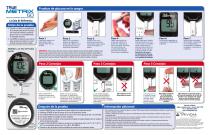
Pruebas de glucosa en la sangre Sistema de automonitoreo de glucosa en la sangre La Guía de Referencia Antes de la prueba ✔ Contacte a su médico o a un profesional de la salud para determinar la frecuencia con la que debe realizarse la prueba de glucosa y cuál es su escala objetivo para los resultados de glucosa. ✔ Lea SIEMPRE el manual del usuario antes de probar el producto por primera vez y antes de utilizar esta guía de referencia rápida. Medidor y La Tira de Prueba Frente Lávese las manos con agua tibia y jabón. Séquela bien. No use alcohol. Reúna sus materiales y prepare el dispositivo...
Open the catalog to page 2All Trividia Health catalogs and technical brochures
 TRUEtrack®
2 Pages
 TRUE FOCUS™
2 Pages
Archived catalogs
 TRUE METRIX®
2 Pages
- Syringe
- Sterile needle
- Control software
- Windows software
- Blood glucose meter
- Safety needle
- Sterile syringe
- Urine test strip
- Test software
- Server-based software
- Printing software
- Blood test strip
- Automatic blood glucose meter
- Safety syringe
- Medical management system
- Blood glucose meter with lancing device
- Hematocrit blood glucose meter
- No coding blood glucose meter