
- Catalogs
- Truphatek International
- Truview Organize Stand

Truview Organize Stand
1 /2Pages

Truview Organize Stand
1 /2Pages
Catalog excerpts
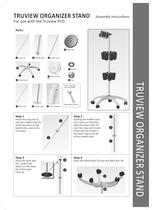
TRUVIEW ORGANIZER STAND Assembly Instructions
Open the catalog to page 1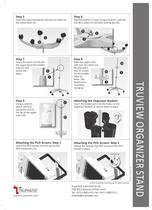
Insert the base locking disc ¡6) into its socket on Attaching the PCD Screen: Step 1 Insert the PCD handle into the slot on the Add the washer (7] and, using a wrench, lock the nut (8¡ in place on the base locking disc (6). Attaching the Organizer Baskets Insert the basket pins into the holes on the Organizer Baskets to secure them in place. Attaching the PCD Screen: Step 2 Rotate the locking ring 180° to secure the PCD
Open the catalog to page 2All Truphatek International catalogs and technical brochures
 Thrombix®
2 Pages
 POLYSITE®
6 Pages
 turnpike
7 Pages
 PiggyBack® Wire Converter
3 Pages
 MAD Nasal
2 Pages
 MiniLap®
2 Pages
 LMA® Airway Portfolio
12 Pages
 Rüsch® TruLite Secure™
2 Pages
 Rüsch® Polaris™
2 Pages
 Tru-MR
2 Pages
 DispoLED
2 Pages
 Truview EVO2 Infant
2 Pages
 GreenLite
1 Page
 TruFlex
2 Pages
 Truview EVO2
2 Pages
 Truview PCD Pediatric
2 Pages
 Truview PCD -R
4 Pages
 EquipLED
1 Page
 GreenSpec2
2 Pages
 Trulite
2 Pages
 GreenLED
2 Pages
 Dolphin handle
1 Page
 TruLED
1 Page
 Set option
2 Pages
 Equip
Equip2 Pages
 Shucman 2
2 Pages
 Lite Blade
2 Pages
 Equiplite
2 Pages
 Truview Pediatriic PCD
2 Pages
 Truview PCD
4 Pages


*Prices are pre-tax. They exclude delivery charges and customs duties and do not include additional charges for installation or activation options. Prices are indicative only and may vary by country, with changes to the cost of raw materials and exchange rates.
About MedicalExpo
MedicalExpo is a marketplace that offers B2B players a complete experience, from product sourcing to purchase. MedicalExpo is an entity of VirtualExpo Group.
Are you a buyer?
Are you a supplier?