
- Catalogs
- Vacu Activ
- Rollshape


- Company
- Products
- Catalogs
- News & Trends
- Exhibitions
Rollshape
1 /46Pages
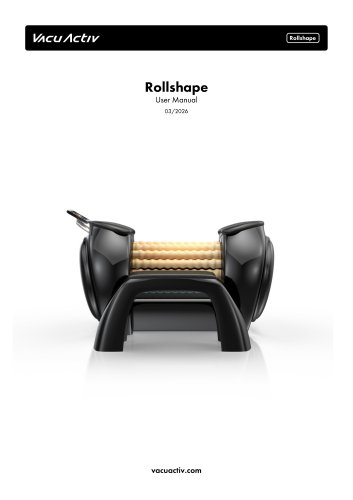
Rollshape
1 /46Pages
Catalog excerpts
User Manual
Open the catalog to page 1
VACUActlV Thank you for purchasing the Premium Rollshape Roller We sincerely appreciate your trust in our product and are delighted to be part of your wellness journey. Copyright 2026 Vacu Activ
Open the catalog to page 2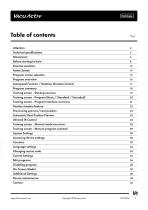
VACUActlV Table of contents ^ Before starting to train 8 Program screen selection 15 Autospeed Function / Rotation direction Control 17 Training screen - Starting exercise 19 Training screen - Program (Basic / Standard / Extended) 20 Training screen - Program interface overview 21 Position timeline feature 22 Previewing previors/next position 23 Automatic Next Position Preview 25 Training screen - Manual mode overview 28 Training screen - Manual program selected 29 Accessing device settings 30 Changing access code 34 Copyright 2026 Vacu Activ
Open the catalog to page 3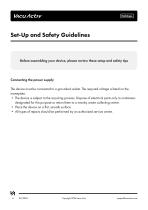
Before assembling your device, please review these setup and safety tipsConnecting the power supply The device must be connected to a grounded socket. The required voltage is listed on the nameplate. • The device is subject to the recycling process. Dispose of electrical parts only to containers designated for this purpose or return them to a nearby waste collecting centre. • Place the device on a flat, smooth surface. • All types of repairs should be performed by an authorized service centre. Copyright 2026 Vacu Activ
Open the catalog to page 4
Copyright 2026 Vacu Activ
Open the catalog to page 5
Copyright 2026 Vacu Activ
Open the catalog to page 6
Copyright 2026 Vacu Activ
Open the catalog to page 7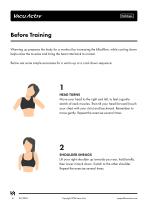
Vacu Activ Before Training Warming up prepares the body for a workout by increasing the bllodflow, while cooling down helps relax the muscles and bring the heart rate back to normal. Below are some simple excersises for a warm-up or a cool-down sequence: 1HEAD TURNS Move your head to the right and left, to feel a gentle stretch of neck muscles. Then tilt your head forward (touch your chest with your chin) and backward. Remember to move gently. Repeat the exercise several times. Lift your right shoulder up towards your ear, hold briefly, then lower it back down. Switch to the other shoulder. Repeat...
Open the catalog to page 8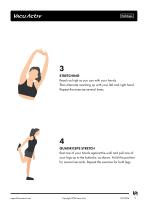
3STRETCHING Reach as high as you can with your hands. "Then alternate reaching up with your left and right hand. Repeat the exercise several times. Rest one of your hands against the wall and pull one of your legs up to the buttocks, as shown. Hold this position for several seconds. Repeat the exercise for both legs. Copyright 2026 Vacu Activ
Open the catalog to page 9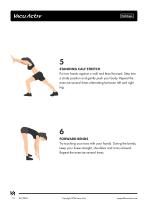
5STANDING CALF STRETCH Put two hands against a wall and lean forward. Step into a stride position and gently push your body. Repeat the exercise several times alternating between left and right leg. Try touching your toes with your hands. During the bends, keep your knees straight, shoulders and arms relaxed. Repeat the exercise several times. Copyright 2026 Vacu Activ
Open the catalog to page 10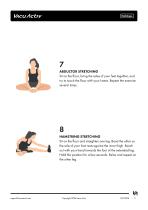
7ABDUCTOR STRETCHING Sit on the floor, bring the soles of your feet together, and try to touch the floor with your knees. Repeat the exercise several times. Sit on the floor and straighten one leg. Bend the other so the sole of your foot rests against the inner thigh. Reach out with your hand towards the foot of the extended leg. Hold this position for a few seconds. Relax and repeat on the other leg. Copyright 2026 Vacu Activ
Open the catalog to page 11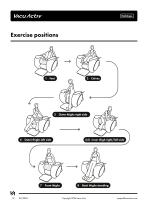
Copyright 2026 Vacu Activ
Open the catalog to page 12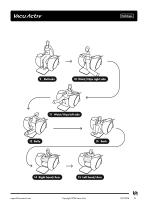
14 Right hand/Arm 15 Left hand/Arm Copyright 2026 Vacu Activ
Open the catalog to page 13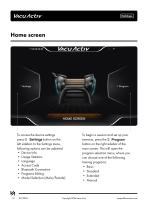
To begin a session and set up your exercise, press the )% Program button on the right sidebar of the main screen. This will open the program selection menu, where you can choose one of the following training programs: 14 03/2026 Copyright 2026 Vacu Activ [email protected]
Open the catalog to page 14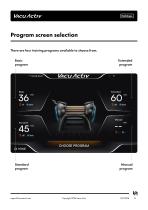
Program screen selection There are four training programs available to choose from. Basic Extended program program Standard Manual program program VA [email protected] Copyright 2026 Vacu Activ 03/2026
Open the catalog to page 15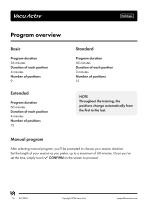
BasicProgram duration 36 minutes Duration of each position StandardProgram duration 45 minutes Duration of each position Extended NOTE Throughout the training, the positions change automatically from the first to the last. Program duration 60 minutes Duration of each position Manual program After selecting manual program, you'll be prompted to choose your session duration. Set the length of your session as you prefer, up to a maximum of 60 minutes. Once you've set the time, simply touch v' CONFIRM on the screen to proceed. Copyright 2026 Vacu Activ
Open the catalog to page 16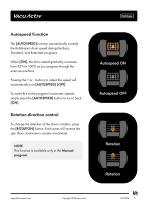
Autospeed Function The [AUTOSPEED] function automatically controls the Rollshape's drum speed during the Basic, Standard, and Extended programs. When [ON], the drum speed gradually increases from 25% to 100% as you progress through the exercise positions. Pressing the + or - buttons to adjust the speed will automatically turn [AUTOSPEED] [OFF], To revert this to the program's automatic speeds, simply press the [AUTOSPEED] button to turn it back [ON]. Autospeed ON Autospeed OFF Rotation direction control To change the direction of the drum's rotation, press the [ROTATION] button. Each press will...
Open the catalog to page 17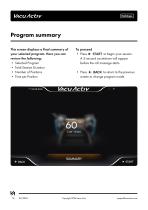
This screen displays a final summary of your selected program. Here you can review the following: • Selected Program • Total Session Duration • Press ► START to begin your session. A 3-second countdown will appear before the roll massage starts. • Press BACK to return to the previous screen to change program mode. Copyright 2026 Vacu Activ
Open the catalog to page 18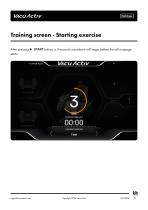
After pressing ► START button, a 3-second countdown will begin before the roll massage starts. Copyright 2026 Vacu Activ
Open the catalog to page 19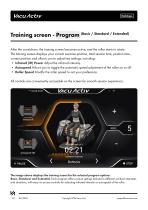
After the countdown, the training screen becomes active, and the roller starts to rotate. The training screen displays your current exercise position, total session time, position time, current position and allows you to adjust key settings, including: * Infrared (IR) Power Adjust the infrared intensity. * Autospeed Allows you to toggle the automatic speed adjustment of the roller on or off * Roller Speed Modify the roller speed to suit your preference. All controls are conveniently accessible on the screen for smooth session experience. PoSITIsjHf TIME LEFT CURRENT POSITION The image above displays...
Open the catalog to page 20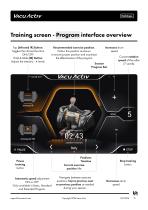
V\cuActivTraining screen - Program interface overview Tap [Infrared IR] Button: Toggles the infrared function Hold & Slide [IR] Button: Adjusts the intensity - 4 levels. Recommended exercise position. Follow this position as shown to ensure proper position and maximize the effectiveness of the program Increases drum speed Current rotation speed of the roller (7 Levels) Positions Timeline Current exercise position title Stop training Automatic speed adjustment Only available in Basic, Standard and Extended Program. Navigate between exercise positions. Tap to preview next or previous position as...
Open the catalog to page 21All Vacu Activ catalogs and technical brochures
 Activ Aqua Bed
30 Pages
 Vibrashape
18 Pages
 Activshape Pilates
36 Pages
 Infrastep
24 Pages
 Standard interface
28 Pages
 Bodyshape V2
58 Pages
 Cryotherapy devices
6 Pages
 Furniture Catalog
8 Pages
 Innovative Slimming Equipment
15 Pages


- Treadmill
- Handisport
- Hydromassage bathtub
- Treadmill with incline
- Holistic medicine
- Cryotherapy unit
- Cryotherapy cabin
- Cryosurgery unit
- Hand-held cryosurgery unit
- Flotation bed
- Hygiene station
- Hydromassage bathtub with chromotherapy lamps
- Hydromassage table with water jet
- Stair climber
- Wellness lounger
- Dermatologic surgery cryosurgery unit
- Recumbent bicycle
- Lower limbs hydromassage bathtub
- Adult recumbent bicycle
- Light therapy lamp