
- Catalogs
- Vetronic Services
- Merlin Training for Vets and Nurses 2014

Merlin Training for Vets and Nurses 2014

Merlin Training for Vets and Nurses 2014
- Introduce users to Merlin's controls and pneumatic connections.
- Explain Merlin's gas flow behavior during normal operation and power failure.
- Train users on setting up Merlin for Volume and Pressure Cycling, and managing patient-ventilator synchrony.
- Include a Leak test in the daily routine.
- Features five control knobs and three switches for ventilation management.
- Flow Rate/Volume: Dual function based on cycling mode; whole numbers for Volume Mode, decimals for Flow Mode.
- Inspiratory Time: Sets breath delivery time; ranges from 0.2 to 9.0 seconds. In Pressure Cycling, it delivers gas until target pressure is reached.
- Expiratory Time: Sets time from end of inspiration to start of next; ranges from 0.2 to 9.0 seconds.
- Maximum Airway Pressure: Safety valve in Volume Cycling; sets target pressure in Pressure Cycling.
- Assist Threshold: Controls trigger point for assisted breaths.
- Stop/Run: Starts or stops the ventilator.
- Flow Rate/Volume Switch: Switches control from Volume to Flow.
- Assist Mode Switch: Activates Assist Mode in both cycling modes.
- Displays Tidal Volume, Minute Volume, Airway Pressure, I:E Ratio, Compliance, and Respiratory Rate.
- Tidal Volume: Mirrors control setting in Volume Cycling; measured value in Pressure Cycling.
- Minute Volume: Set value in Volume Cycling; measured in Pressure Cycling.
- Airway Pressure: Shows Peak Inspiratory Pressure (PIP) and PEEP.
- I:E Ratio: Ratio of inspiratory to expiratory time; updated continuously in Volume Cycling.
- Compliance: Measures dynamic compliance; varies with patient and conditions.
- Respiratory Rate: Reflects control settings in Volume Cycling; calculated in Pressure Cycling.
- Requires connections to and from the anaesthetic machine and patient.
- Configured for both rebreathing and non-rebreathing systems.
This document provides technical guidance on setting up and operating the Merlin ventilator system, focusing on both rebreathing and non-rebreathing circuits, as well as volume and pressure cycling modes.
Rebreathing systems recycle waste gas, suitable for larger patients due to CO2 absorber resistance. Non-rebreathing circuits require a reservoir bag and an APL valve to manage fresh gas flow and prevent overfilling.
Merlin operates with continuous gas flow, with valves controlling direction during inspiration and expiration. Allows spontaneous breathing during power failure.
Volume cycling uses patient weight to determine tidal volume. For a 30kg Labrador, set tidal volume to 300mls, inspiratory time to 1 second, and expiratory time for a respiratory rate of 15 breaths per minute. Set Maximum Airway Pressure (MAP) 10cm above normal expected pressure.
Understanding respiration physiology is crucial, focusing on chemical and mechanical receptors and CO2 levels' effects on respiratory drive.
Pressure cycling controls inspiration by airway pressure, offering safer pressure management, especially for small animals. Adjust flow rate based on animal weight, and set MAP according to patient size.
Provides detailed instructions for setting up and operating the Merlin ventilator, emphasizing understanding respiratory physiology for effective patient ventilation management.
Outlines setup and operation in pressure cycling mode, ensuring Assist mode is off unless needed. Describes alarms like 'TARGET PRESSURE NOT REACHED' and 'LOW INSP PRESSURE' due to leaks or other issues.
Discusses scenarios of patient-ventilator desynchrony, with solutions like turning off ventilator support, manually bagging the patient, or adjusting settings to match patient breathing.
Goals include overriding spontaneous respiratory drive, delivering adequate minute volume for oxygen and anesthetic delivery, and managing end-tidal CO2 levels.
Provides a detailed procedure for performing a leak test, setting specific controls, and using tubing to check for leaks, with steps for addressing issues.
Instructions for cleaning and disinfecting the ventilator, especially after use with contagious respiratory diseases, recommending F10 disinfectant and outlining cleaning procedures for external tubing and internal structure.
Catalog excerpts

Quality Anaesthetic monitoring Merlin Training for Vets and Nurses • To familiarise users with the controls of Merlin • To familiarise users with the pneumatic connections of Merlin • To ensure that users understand the behaviour of Merlin in terms of gas flow, both during normal use and with the machine OFF/Power • To train users to set up Merlin for Volume Cycling in a range of patients and to understand the implications and effects of changing different • To train users to respond to patients 'fighting the ventilator' and to establish breathing control using IPPV • To train users to set up Merlin for Pressure Cycling and to understand the benefits of Pressure Cycling over Volume Cycling • To train users how to run a Leak test as part of their daily routine Registered Office: 12 Henley's Business Park, Manor Road, Abbotskerswell, Newton Abbot, Devon TQ12 5NF * w^*"*' *" CRN:4694235; VAT No 585 6341 12. Managing Director: Keith Simpson BVSc MRCVS MIET(Electronics)
Open the catalog to page 1
Registered Office: 12 Henley’s Business Park, Manor Road, Abbotskerswell, Newton Abbot, Devon TQ12 5NF CRN:4694235; VAT No 585 6341 12. Managing Director: Keith Simpson BVSc MRCVS MIET(Electronics)
Open the catalog to page 2
Merlin Controls Despite its appearance Merlin only has 5 control knobs and three switches to control all forms of ventilation. The control functions will be covered first. Their role in the full control of assisted ventilation will be covered more fully later. The control knobs will be discussed first, left to right. Flow Rate / Volume The first knob has dual functionality depending on which cycling mode is selected. All volumes are in whole mls and all Flow values are in decimal values e.g. 2.5, so it is easy to tell which mode is selected. If the number is a whole number then the knob is in...
Open the catalog to page 3
Maximum Airway Pressure This control knob has dual functionality. It always represents a maximum permissible airway pressure but depending on the operating mode of the ventilator this will be interpreted in one of two different ways. In volume cycling mode the Maximum Airway Pressure is the 'Safety Valve' pressure that the airway is allowed to reach before inspiration is halted. As such in normal use it rarely has any effect on the operation of the machine. The Maximum Airway Pressure should be set to approximately 10 cm above the normal Peak Inspiratory Pressure (PIP). For example the normal...
Open the catalog to page 4
Flow Rate / Volume Switch This switch changes the control function from a Volume Control (in mls) to a Flow Control (in L/min). This does NOT set the ventilator into a pressure cycling mode but simply provides another way of determining how to deliver a volume breath. When the switch is down the value shown by the control is in mls and the Tidal Volume is exactly the same as shown on the top line of the main display. When the switch is up the value shown is a flow value and that combined with the inspiratory time will determine the delivered volume. Again the actual volume, calculated by the...
Open the catalog to page 5
Quality Anaesthetic monitoring This shows the ratio between the inspiratory time and expiratory time. It is usual when using prolonged mechanical ventilation to maintain this ratio at greater than 1:2, so that expiration is always at least twice as long as inspiration. This reduces the effect of mechanical IPPV on the cardiovascular In volume cycling mode this value is continuously updated as changes are In pressure cycling mode this value is updated at the end of each inspiratory This value measures the dynamic compliance of the patient and the patient circuit. Usually the patient compliance...
Open the catalog to page 6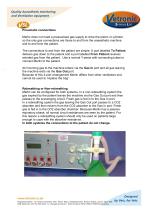
Quality Anaesthetic monitoring Pneumatic connections Merlin does not need a pressurised gas supply to drive the piston or cylinder so the only gas connections are those to and from the anaesthetic machine The connections to and from the patient are simple. A port labelled To Patient delivers gas down to the patient and a port labelled From Patient receives exhaled gas from the patient. Use a normal Y-piece with connecting tubes to connect Merlin to the patient. All incoming gas to the machine enters via the Gas In port and all gas leaving the machine exits via the Gas Out port. Because of this...
Open the catalog to page 7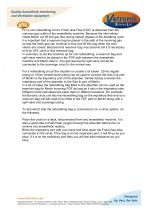
Quality Anaesthetic monitoring For a non-rebreathing circuit, Fresh Gas Flow (FGF) is delivered from the common gas outlet of the anaesthetic machine. Because the inlet valves inside Merlin cut off this gas flow during certain phases of the breathing cycle it is important that a reservoir bag be placed in the path of the incoming gas so that the fresh gas can continue to flow and fill this bag when the inlet valves are closed. Because this reservoir bag may become full it is necessary to fit an APL valve to this reservoir bag. In summary, to set the machine up for non-rebreathing, a reservoir...
Open the catalog to page 8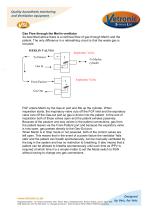
Quality Anaesthetic monitoring Gas Flow through the Merlin ventilator As described above there is a continual flow of gas through Merlin and the patient. The only difference in a rebreathing circuit is that the waste gas is MERLIN VALVES Inspiratory Valve From Patient" Expiratory Valve FGF enters Merlin by the Gas-In port and fills up the cylinder. When inspiration starts, the inspiratory valve cuts off the FGF inlet and the expiratory valve cuts off the Gas-out port so gas is driven into the patient. At the end of inspiration both of these valves open and the patient exhales passively. Because...
Open the catalog to page 9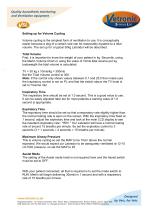
Quality Anaesthetic monitoring Setting up for Volume Cycling Volume cycling is the simplest form of ventilation to use. It is conceptually easier because a dog of a certain size can be reasonably equated to a tidal volume. The set up for a typical 30kg Labrador will be described. Tidal Volume First, it is important to know the weight of your patient in kg. Secondly, using the Merlin Volume Chart or using the value of 10mls tidal volume per kg bodyweight the tidal volume is calculated. Set the Tidal Volume control to 300. Note: If the control only shows values between 0.1 and 25.0 then make sure...
Open the catalog to page 10All Vetronic Services catalogs and technical brochures
 CardioStore
2 Pages
 VitalStore MultiMonitor
2 Pages
 SAV04
SAV042 Pages
 Lightning
2 Pages
 SAV04
SAV041 Page
 MiniTemp Specification Sheet
2 Pages
 BSAVA 2014 Flyer
1 Page
 Consumables Catalogue
7 Pages
 SAV03 Specification Details
2 Pages





Archived catalogs
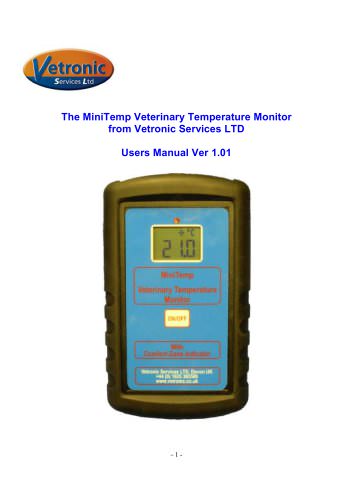 MiniTemp Operators Guide
8 Pages
 Taurus_500
32 Pages


- Patient monitor
- Blood pressure patient monitor
- ECG patient monitor
- SpO2 patient monitor
- Multi-parameter monitor
- Portable patient monitor
- NIBP patient monitor
- Intensive care patient monitor
- TEMP patient monitor
- Multi-parameter O2 monitor
- Pulse oximetry multi-parameter monitor
- Multi-parameter ECG monitor
- Blood pressure multi-parameter monitor
- Compact patient monitor
- Multi-parameter NIBP monitor
- Veterinary anesthesia system
- TEMP multiparameter monitor
- CO2 multiparameter monitor
- Multi-parameter monitor with touchscreen
- EtCO2 patient monitor