
- Catalogs
- Vetronic Services
- Taurus_500

Taurus_500

Taurus_500
The Taurus-500 is a handheld data-logger designed for veterinarians to facilitate on-farm Tuberculosis (TB) and Brucellosis testing. It features quick data entry with on-screen prompts and stores data securely in non-volatile RAM, ensuring data safety even if the battery fails. The device remembers the last animal tested, aiding faster data entry for similar groups of cattle. It checks for duplicate ear numbers to prevent errors and allows notes for conditions like Skin TB.
The Taurus-500 operates on 4 AA batteries and includes a 43-key keypad, a 20-character display, and electronic calipers for measuring skin thickness. Data can be entered manually or electronically and is retrievable via a PC connection.
Initialization of the electronic calipers is required to read zero when fully closed. Data entry begins with selecting options for new or existing farms and the type of test (TB, BS, or both).
Starting a new farm involves entering the farm name, CPH number, vet code, and time/date. Animal identification includes herd and ear numbers, with checks for duplicates and checksum validation for UK ear tags.
Details such as sex, breed, and age are entered, with defaults available for repeated entries. Measurements for avian and bovine readings are taken using calipers, and notes can be added for specific conditions.
The software supports data management, including uploading and editing data, and printing standard forms like TB52/52A and BS5/5A. The device connects to a PC via a serial port for data transfer.
Data can be sorted, searched, and edited using the software. The Taurus-500 supports management tags and UK herd/ear number validation.
The Taurus-500 is made from rugged polyamide plastic, with a reflective LCD screen and a caliper range of 0-50mm. It operates on 4 AA batteries, with a battery life of over 125 hours, and can store data for up to 940 animals.
This field is used for Brucellosis testing data collection but not for TB testing. It appears in the Brucellosis report as the calving date.
Confirm details by pressing YES to save or NO to discard. Continue adding data by responding to the “More?” prompt.
Select OLD FARM to access stored records. If no data is recorded, the screen will indicate this. Records can be added if the selected farm is the last or only one on the list.
If more cows need to be added, select YES to continue data input. If not, the unit assumes it is day 3 of the test, and the Search screen appears.
Use the 'E' key to search by ear number. The system shows the testing status and allows finding cows by matching the end of their ear numbers.
Press 'U' to list untested animals. Select the animal to test by pressing YES.
Select an animal to enter avian and bovine readings. Ensure the Day 3 reading is not less than Day 1 to avoid errors.
The unit performs standard and severe test interpretations and displays results. Save the results by pressing YES.
Pre-load the Taurus-500 with data from sources like the BCMS website. Confirm details before proceeding to skin readings.
Designed for Windows 95/98/2000 & NT. Connect via a serial link at 19200 baud. Follow installation prompts from the CD-ROM.
Select the COM port for the Taurus unit. Use the software to upload data, which is displayed in a DEFRA-style TB Form.
Edit records on TB52A and BS5A forms by double-clicking entries. Use the 'Apply zero change' feature for automatic Day 3 readings.
Some fields are auto-filled, but others require manual entry and signing. Keep copies for records.
Switch between standard and severe interpretation levels via the software menu.
Import text files formatted like CTS files for integration with Taurus-500.
To import a text or CSV file, use the File/Open CTS File option. The data is then presented on TB52/A and BS5/A sheets. Downloading involves selecting the Download option and entering farm information. Error checking is employed during uploads and downloads.
Data can be saved as .tbs files using the File/Save options. This allows for data management across multiple test days, ensuring the Taurus-500's capacity is not exceeded. Files can be printed, faxed, and opened using TAURUS software.
Data can only be erased when the Taurus-500 is connected to a PC. This prevents accidental data loss. The process involves confirming the action through dialog boxes.
The software allows navigation through TB and Brucellosis forms, with options to move between pages. Brucellosis data can be viewed and printed similarly to TB data.
Forms are designed for A4 portrait printing, preferably in color. Double-sided printing is supported if the printer allows. Ensure compliance with DEFRA requirements for black and white submissions.
The Data menu offers options for sorting, finding, and managing records. Features include applying zero change, deleting records without TB readings, and managing tags. UK herd number validation is also included.
Vetronic Services LTD, Torquay, Devon, United Kingdom. Tel: 01803 323943, Fax: 0870 129 4705, Email: [email protected], Web: www.vetronic.co.uk.
Catalog excerpts
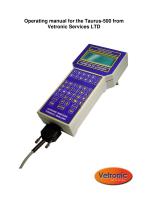
Operating manual for the Taurus-500 from Vetronic Services LTD
Open the catalog to page 1
Contents Introduction to the Taurus-5 0 0 …………………………………………………… 3 O ev wa dMo eo o eai ………………………………………………… v ri n e d f p rt n o 4 Using the Taurus-5 0frh fs t …………………………………………… 0 o te i ti r me 5 Ii li tee c o ic les n iin h l t n ap r ………………………………………………. t sg a er c i 5. Data Entry using the Taurus-5 0 0 ………………………………………………. 5 E tr gD t fr N W F R nei aa o a E n A M………………………………………………. 6 F R N ME A M A …………………………………………………. 6 . C HN mb r P u e……………………………………………. 6 ……… V TC D ……………………………………………………. E O E 6 TMED T …………………………………………………………. I /A E 7 . . Ip t ga i l eas n ut n i n ma d ti…………………………………………………………....
Open the catalog to page 2
Working with the data 27 S rn ted p y aa ot g h i l d t…………………………………………………. 27 i sa Fn aR c r……………………………………………………………. 28 i d e od Ce rh F u dR c r…………………………………………………. 28 l te o n e od a . A daN wR c r………………………………………………………. 28 d e e od A p z r c a g ……………………………………………………… p l eo h n e y 28 D l i rc rs i n T ra i s e t g e od wt o B e d g …………………………………. 28 en h n Ea ed t f m teT uu u i rs aa r h a rs n ……………………………………… o t 28 Ma a e n T g ………………………………………………………. 28 n g me t a s U h r/a n mb r ad t n K ede r u e v lai …………………………………………………… i o
Open the catalog to page 3
Introduction to the Taurus-500 The Taurus-500 is a new, hand-held data-logger designed specifically for vets performing on-farm Tuberculosis and Brucellosis testing. With the Taurus-500 data can be entered quickly and easily by following the on-screen prompts. All data is saved on non-volatile RAM meaning that your data is safe in the event of battery failure. The Taurus-500 has a memory feature that remembers details of the last animal tested and uses this as the default prompt for the next animal. This means that Herd Numbers, Ages, Sex and Breed need only be entered once for a group of cattle...
Open the catalog to page 4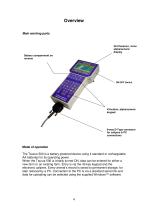
Overview Main working parts 20-Character, 4-line alphanumeric display Battery compartment on reverse ON/OFF Switch 9-way D-Type connector for calipers & PC connections Mode of operation The Taurus-500 is a battery-powered device using 4 standard or rechargeable AA batteries for its operating power. When the Taurus-500 is initially turned ON, data can be entered for either a new farm or an existing farm. Entry is via the 43-key keypad and the e c o ic les E ey n l rc r is ved to permanent storage, for l t n ap r. v r a i ’ e od s a er c i mas later retrieval by a PC. Connection to the PC is via...
Open the catalog to page 5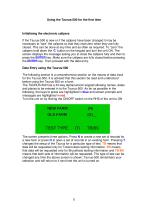
Using the Taurus-500 for the first time Initialising the electronic calipers If the Taurus-500 is new or if the calipers have been changed it may be n c say o“ r”h c les ota te ra z r w e te aefl e e s r t t e te ap r s h th y e d eo h n h y r uy a i l c s d T ic nb d n a a y i a da otna rq i d T “eo te l e. h a e oe tn t o s me n s f e s e u e . o z r”h r calipers hold down the‘ b t no tek y a a dtr teu i N T e C’ ut n h e p d n un h n O . h o t screen displays the message asking you to close the calipers fully and then to press the ENTER key. Make sure the calipers are fully closed before pressing...
Open the catalog to page 6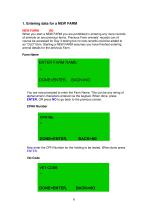
1. Entering data for a NEW FARM NEW FARM (N) When you start a NEW FARM you are prohibited in entering any more records o a i lo a y rv u fr . rv u F r a i l rc rs a o f n s n n pe i s ams Pe i s am n s e od c n f ma o o ma ’ course be accessed for Day 3 testing but no new records could be added to a “ L ”am. trn aN W F R a s me y uh v f i e e tr g n O D fr Sat g E i A M su s o a e is d nei nh n animal details for the previous Farm. Farm Name You are now prompted to enter the Farm Name. This can be any string of alphanumeric characters entered via the keypad. When done, press ENTER, OR press NO...
Open the catalog to page 7All Vetronic Services catalogs and technical brochures
 CardioStore
2 Pages
 VitalStore MultiMonitor
2 Pages
 SAV04
SAV042 Pages
 Lightning
2 Pages
 SAV04
SAV041 Page
 MiniTemp Specification Sheet
2 Pages
 BSAVA 2014 Flyer
1 Page
 Consumables Catalogue
7 Pages
 SAV03 Specification Details
2 Pages





Archived catalogs
 MiniTemp Operators Guide
8 Pages


- Patient monitor
- Blood pressure patient monitor
- ECG patient monitor
- SpO2 patient monitor
- Multi-parameter monitor
- Portable patient monitor
- NIBP patient monitor
- Intensive care patient monitor
- TEMP patient monitor
- Multi-parameter O2 monitor
- Pulse oximetry multi-parameter monitor
- Multi-parameter ECG monitor
- Blood pressure multi-parameter monitor
- Compact patient monitor
- Multi-parameter NIBP monitor
- Veterinary anesthesia system
- TEMP multiparameter monitor
- CO2 multiparameter monitor
- Multi-parameter monitor with touchscreen
- EtCO2 patient monitor