
- Catalogs
- West Medica
- Vision Sperm® ? Digital systems for sperm analysis

Vision Sperm® ? Digital systems for sperm analysis

Vision Sperm® ? Digital systems for sperm analysis
Vision Sperm® is an integrated digital system developed by West Medica for sperm quality analysis. It combines digital microscopy with advanced software to manage and analyze sperm samples, patient data, and results efficiently. The system is designed for use in various medical settings, including clinical laboratories, urology and andrology departments, and fertility clinics.
Key Features
- Automatic Sperm Quality Analysis: Provides quick fertility screening with a wide range of parameters tested. Results are integrated into a comprehensive report.
- Improved Workflow: Enhances productivity and reduces physical strain on users through ergonomic design and efficient data management.
- Professional Development: Offers resources for continuous learning and collaboration among medical professionals.
- Network Capabilities: Facilitates data sharing and remote access, allowing for video conferencing and integration with other information systems.
System Components
- Vision CAM® Digital Camera: Captures high-quality digital images for analysis.
- SQA IIC-P and QwikCheck Gold Analyzers: Perform automatic assessments of semen parameters, providing quick and reliable results.
- Software and Database: Manages patient records, stores analysis results, and supports report generation and customization.
Applications
- Clinical and semen analysis laboratories
- Urology and andrology departments
- Infertility and family planning centers
Benefits
- Accurate Diagnosis: Ensures reliable and objective analysis through specialized software and documentation.
- Efficient Data Management: Simplifies the creation and management of patient records and analysis reports.
- Collaboration and Education: Supports professional growth through shared expertise and educational tools.
Specifications
- Includes a biological microscope, digital camera, and software for comprehensive sperm analysis.
- Compatible with microscopes from various manufacturers.
- Offers customizable report templates and supports multiple data formats for export.
Catalog excerpts
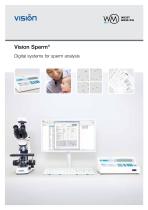
Vision Sperm® Digital systems for sperm analysis
Open the catalog to page 1
Vision SPERM West Medica Digital microscopy Digital microscopy is a digital environment for managing and analyzing microscopy data, which is obtained using a microscope, a camera, software and a computer. Digital microscopy allows you to attain qualitative and quantitative results, which are either impossible to receive by other means or cost and time consuming. West Medica feels strongly that innovation is the key to a brighter future and improves the quality of life for everyone. Development of “Vision” solutions for digital microscopy is a top priority and the main focus of West Medica. Technology...
Open the catalog to page 2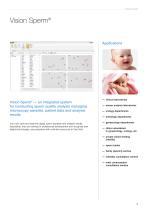
Vision SPERM Vision Sperm® Applications Vision Sperm® — an integrated system for conducting sperm quality analysis managing microscopy samples, patient data and analysis results You now store and examine digital sperm samples and analysis results. Specialists, that are looking for professional development and recognize new digital technologies, are presented with unlimited resources in their field. — clinical laboratories — semen analysis laboratories — urology departments — andrology departments — gynaecology departments — clinics specialized in gynaecology, urology, etc. — private clinics treating...
Open the catalog to page 3
Vision SPERM Automatic sperm quality analysis Improved quality of work Ergonomically correct workstation Continuous professional development of employees Benefit from knowledge and experience of your colleagues Internet and network capabilities Automatic assessment of semen parameters. Quick fertility screening of sperm samples. A wide range of parameters tested. Information from the sperm quality analyzer is integrated into the sperm analysis report and stored in the database. Provide a reliable diagnosis. Accurate and objective analysis is due to report documentation and specialized software...
Open the catalog to page 4
Vision SPERM Main characteristics Saving of parameters received from sperm quality analyzer Sperm microscopy and capture of a superior quality digital sample Convenient organization and professional tools Information from the sperm quality analyzer should be entered in the database and is integrated into the sperm analysis report. Sperm microscopy and capture of a perfectly crisp digital image in one quick step. Received data and microscopic images are then integrated into a report automatically. Convenient work with digital samples. Find a required object on the microscopy sample in video mode,...
Open the catalog to page 5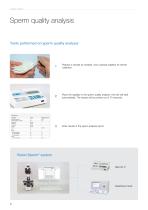
Vision SPERM Sperm quality analysis Tests performed on sperm quality analyzer Prepare a sample for analysis. Use a special capillary for semen collection. Place the capillary in the sperm quality analyzer, the test will start automatically. The results will be printed out in 75 seconds. Enter results in the sperm analysis report. Vision Sperm® system QwikCheck Gold
Open the catalog to page 6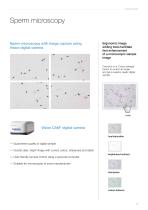
Vision SPERM Sperm microscopy Sperm microscopy with image capture using Vision digital camera Ergonomic image editing tools facilitate fast enhancement of a microscopic sample image One click on a ‘Colour settings’ button to correct an image and get a superior quality digital sample. Vision CAM® digital camera hue/saturation — Guaranteed quality of digital sample — Crystal clear, bright image with correct colour, sharpness and detail — User-friendly camera control using a personal computer — Suitable for microscopes of most manufacturers sharpness colour balance
Open the catalog to page 7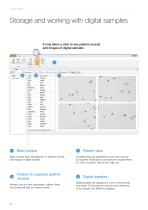
VISION SPERM Storage and working with digital samples tcMer P*bmt Aluf It only takes a click to see patient records and images of digital samples Basic working tools. Management of patients records and images of digital samples. All patient data are presented in chart form that can be adjusted individually by choosing the required fields: ID, name, surname, date of birth, age, etc. Folders to organize patient Modem tools for data organization: folders, filters and sorting will help you search quickly. Digital samples are displayed in a form of thumbnails and tables. Thumbnails are used for quick...
Open the catalog to page 8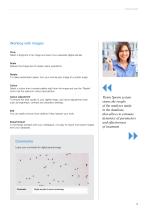
Vision SPERM Working with images Crop Select a fragment of an image and save it as a separate digital sample. Scale Reduce the image size for easier online operations. Rotate To make examination easier, turn your microscopic image at a certain angle. Colour Select a colour from a preset palette right from the image and use the ‘Pipette’ tool to set the optimum colour reproduction. Colour adjustment To ensure the best quality of your digital image, use colour adjustment tools such as brightness, contrast and saturation settings. Edit You can easily remove minor defects if they hamper your work....
Open the catalog to page 9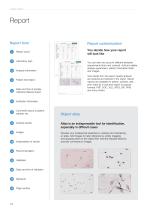
Vision SPERM Report Report form Report customization You decide how your report will look like Report name Laboratory logo Analysis information Patient information Date and time of sample collection/delivery/report Institution information Comments about a patient/ sample, etc. Analysis results Atlas is an indispensable tool for identification, especially in difficult cases Develop your professional expertise by creating and maintaining an atlas. Add images for later reference by simply dragging and dropping them to the object field. Add the required sections and text comments to images. Date...
Open the catalog to page 10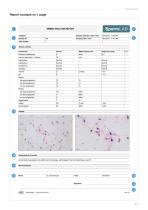
VISION SPERM Report example on 1 page SEMEN ANALYSIS REPORT Canoentralion parametera 3-e wrBim (ha normal range, parantaga of normal rvoTnoiogy B ovef 15
Open the catalog to page 11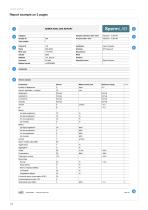
VISION SPERM _ Report example on 2 pages SEMEN ANALYSIS REPORT
Open the catalog to page 12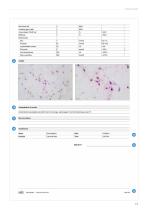
VISION SPERM
Open the catalog to page 13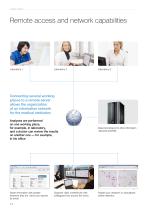
Vision SPERM Remote access and network capabilities Connecting several working places to a remote server allows the organization of an information network for the medical institution Analyses are performed on one working place, for example, in laboratory, and a doctor can review the results on another one — for example, in his office Share information with people wherever they are. Send your reports by email. Organize video conferences with colleagues from around the world. Data import/export to other information networks (LIS/HIS). Publish your research on specialized online networks.
Open the catalog to page 14All West Medica catalogs and technical brochures
 Vision Hema® Network
1 Page
 Vision Hema® Integro
4 Pages
 V-Counter® PC-analyzer
4 Pages
 Vision Hema® Remote
4 Pages
 V-Counter® PC Analyzer
4 Pages
 Vision Master catalogue 2014
62 Pages


Archived catalogs

- Cell imaging system
- Automatic cell imaging system
- Hospital management system
- Laboratory cell imaging system
- Fluorescence cell imaging system
- Laboratory management system
- Diagnostic cell imaging system
- Molecular biology cell imaging system
- Phase contrast cell imaging system
- Bright field cell imaging system
- Blood cell cell imaging system
- Hematology cell imaging system
- Clinical cell imaging system
- Veterinary laboratory cell imaging system
- Karyotyping cell imaging system
- FISH cell imaging system